FlexiFunnels Source Tracking is marketing attribution software, built into FlexiFunnels, that traces every lead and every sale back to the ad or channel that brought the buyer. It matches each buyer by email or phone number across checkout sales, offline payments, upsells and renewals. You see the real ROI of every ad, not just the cheap leads, and you can move your budget to the ads that actually sell.
Same ad spend. 15% more sales. That's the promise. And if Source Tracking doesn't help your ads grow within 30 days, you don't pay.
Source Tracking is live inside FlexiFunnels today. This guide covers what it does and why your ad platform's numbers are wrong. It also walks through every report with real screenshots, worked examples, and how to set it up in an afternoon.
New to FlexiFunnels? See FlexiFunnels here, or try FlexiFunnels here (start your 14-day free trial, no credit card needed). Already a customer? Jump to how to switch on Source Tracking.
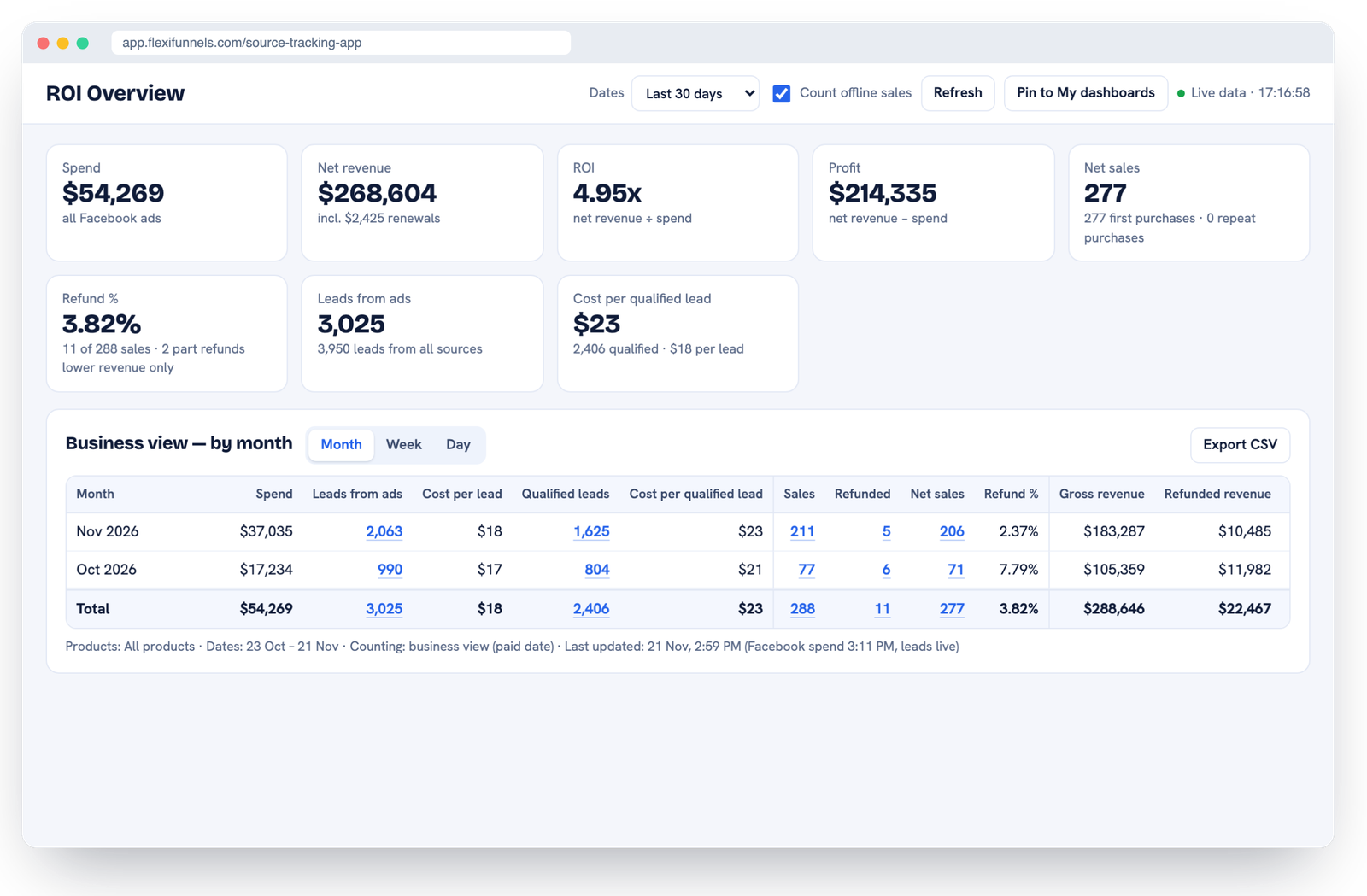
The ROI Overview inside FlexiFunnels Source Tracking: spend, sales, refunds, net revenue, ROI and profit on one screen.
What is marketing attribution software?
Marketing attribution software connects each sale to the marketing that caused it: the ad, email, post or message a buyer interacted with before paying. Instead of trusting each ad platform's own report, it records every touchpoint on your side and assigns credit using a clear rule, such as first touch or all touch.
Good attribution answers three questions every business owner running ads asks every week:
Which ads actually make me money, not just leads?
Which ads should I scale, and which should I switch off today?
What is my real return on ad spend after refunds, offline payments and renewals?
FlexiFunnels Source Tracking answers all three inside the same account that already runs your pages, checkout and courses. That matters, because attribution software usually breaks at the hand-off between your ad account, your page builder and your checkout. Here, all three are one system.
Why are my Facebook ads not tracking purchases?
Your Facebook ads miss purchases because Facebook can only credit the sales it can see, and since 2021 it sees less every year. Privacy changes on iPhones and browsers, blocked pixels, buyers switching devices and payments made off your page all hide sales from Ads Manager.
One iPhone popup made Facebook partly blind
In April 2021, Apple's iOS 14.5 update put the "Ask App Not to Track" question on every iPhone (see Apple's App Tracking Transparency rules). When someone taps it, the Facebook app is no longer allowed to follow that person to other apps and websites, including your page and your checkout. Apple has tightened privacy in almost every update since.
Then the browsers joined in
Safari caps tracking cookies at 7 days, and at 24 hours when the visit came from a click-tracking link (WebKit's Intelligent Tracking Prevention).
Safari links strip Facebook's click ID from links opened in Mail, Messages and Private Browsing.
Brave blocks Facebook's tracking pixel by default.
Firefox blocks the most common Facebook trackers by default.
Ad blockers stop the pixel from loading at all.
Two devices: people click your ad on the phone and pay later on the laptop.
So the ad platforms go blind in three places
Leads. Someone registers, but their phone or browser blocked the tracking. Ads Manager never counts that lead, so a good ad looks expensive.
Checkout sales. Someone clicks your ad and buys straight away. But the pixel was blocked, or they closed the page before the thank-you page loaded. The platform never sees the sale.
Sales that come later. They pay days later, after a webinar or a sales call, by bank transfer, card over the phone or a payment plan. Facebook's default attribution setting credits an ad for only 7 days after a click. It never sees money that skips your page.
A real example: 221 registrations Facebook never showed
On one ad set, on one day, Facebook Ads Manager reported 638 registrations. FlexiFunnels counted 859. That's 221 people (+35%) that Facebook never showed, about 1 in every 4 real registrations.
Same ad set, same day | Registrations |
|---|---|
Facebook Ads Manager reported | 638 |
FlexiFunnels counted | 859 |
People Facebook never showed | +221 (about 1 in 4) |
If you set your budget from the 638, you're setting it on bad data. The ad looks 35% more expensive per lead than it really is, and you may pause one of your best ads.
FlexiFunnels Source Tracking doesn't depend on the pixel, the cookie or the browser. It reads your own tracking tags on your own pages and matches the buyer by email or phone.
What is FlexiFunnels Source Tracking?
FlexiFunnels Source Tracking is the attribution app inside FlexiFunnels. It joins your ad accounts, your leads, your checkout sales and your offline payments, and credits every sale to the ad or channel that first brought the buyer.
It covers every channel you sell from:
Ad platforms: Facebook and Instagram ads are live. Google, ChatGPT, YouTube, TikTok, LinkedIn, Microsoft, Snapchat, Pinterest and X ads are coming, in the same reports.
Every other channel, tracked from the tags on your links: organic posts, email, SMS, WhatsApp, reels, YouTube videos, stories, DMs, communities, affiliates, webinars, podcasts, and QR codes at events.
So you can finally compare a reel against a paid ad, or a WhatsApp broadcast against an email, by the money each one brought in.
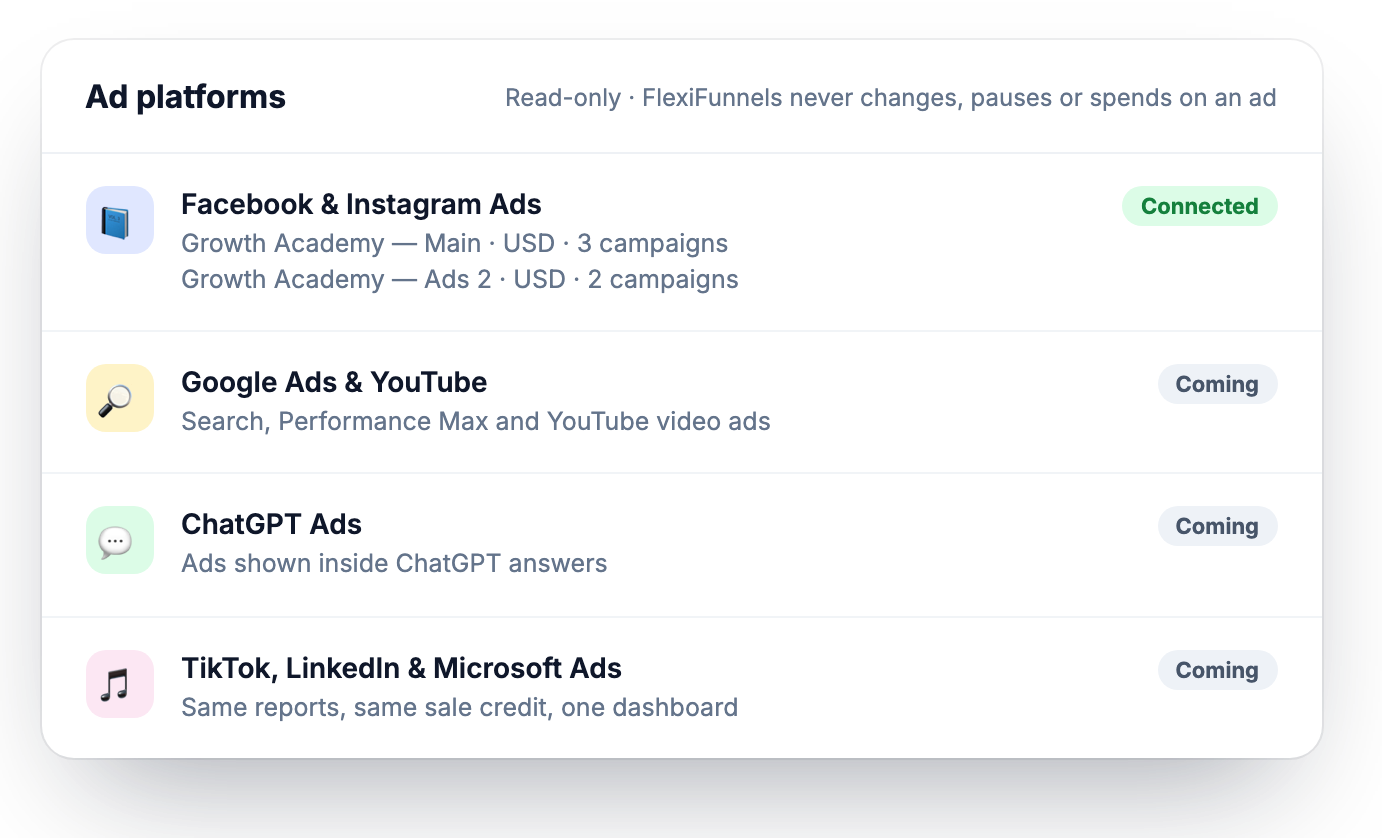
Connections: Facebook and Instagram connected read-only, with more ad platforms coming.
How does Source Tracking work? (3 steps)
You connect your ad accounts read-only, add one line of tracking tags to your ads and links, and FlexiFunnels matches every lead and sale to its source by email or phone. No developer, and no change to your pages or checkout.
Connect your ad accounts. The connection is read-only. Facebook and Instagram today, more platforms coming. FlexiFunnels reads spend, ad names and each ad's link settings. It can never create, change, pause or spend on an ad.
Tag your ads and links. Paste one line of text into each ad's URL parameters. Add a source tag to the links you share in emails, reels, DMs or WhatsApp. Tracking Health flags any ad that is missing it.
FlexiFunnels joins the dots. Every lead and every sale, online or offline, is matched to its ad or channel by the buyer's email or phone number, even if they paid weeks later on another device.
One buyer, traced from the first click to the last renewal
This is the clearest way to see what attribution software changes. Example numbers:
When | What she did | Paid |
|---|---|---|
Day 0 | Clicks your ad on her phone and registers | $0 |
Day 3 | Attends your webinar after an email reminder | $0 |
Day 10 | Pays for your workshop by bank transfer | $497 |
Month 2 | Buys your high-ticket program | $2,997 |
Months 3–12 | Renews her $97/month membership 10 times | $970 |
Total | $4,464 |
What the ad platform saw: 1 lead, $0 in sales. The payment came outside the 7-day window and was made off the page. The ad looks like one to switch off.
What FlexiFunnels Source Tracking credits to the ad: $4,464. Every payment, upsell and renewal is traced back to the ad that brought her.
The ad you would have paused is one of your best.
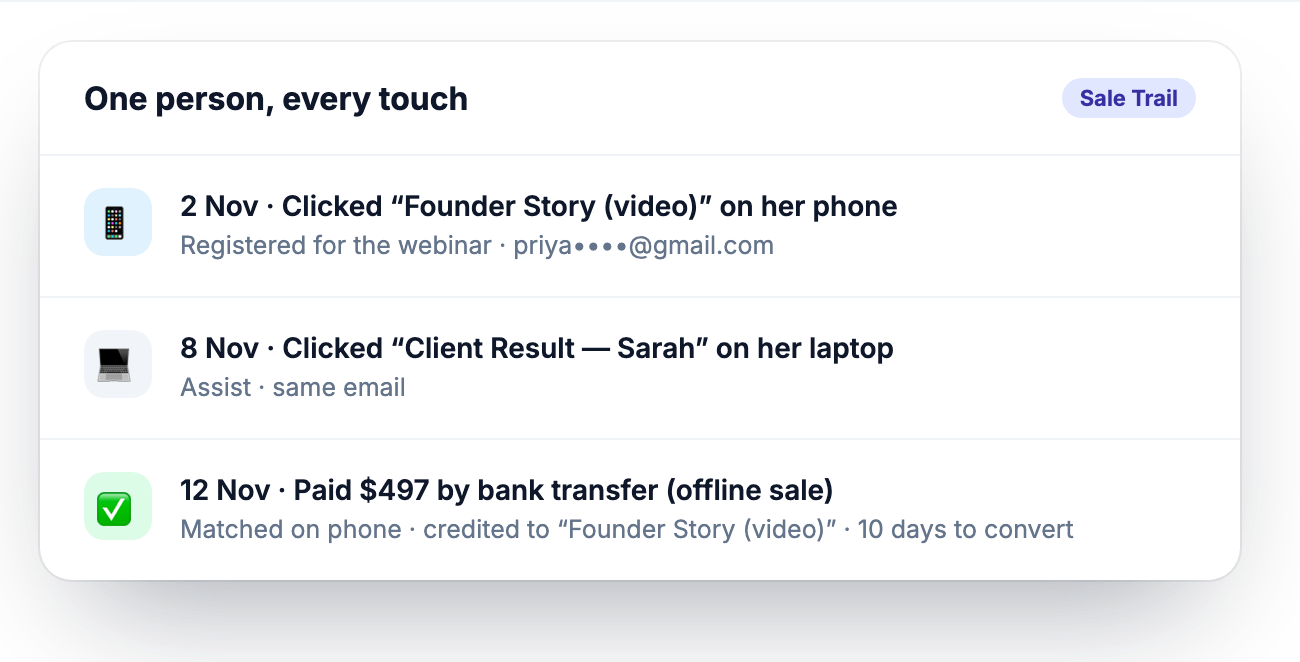
One buyer, two devices, an offline payment: still matched to the right ad by email or phone.
See it in your own account. Try FlexiFunnels here and connect your ad account, or book a free 1:1 consultation and we'll show you Source Tracking on a call.
Every report inside Source Tracking (with screenshots)
ROI Overview: money in vs ad spend, for any dates
One screen with the numbers that decide your ad budget: what you spent, what came in and what you kept.
Spend, leads and cost per lead, straight from your connected ad accounts.
Sales, refunds and net sales, with gross, refunded and net revenue.
Renewals counted in your business revenue.
ROI and profit by month, week or day.
Count offline sales on or off with one switch.
Pin any view to My dashboards, and export to CSV.
Campaign → Ad set → Ad ROI: see which ad actually sells
Open the campaign tree and go down to the single ad. Every row shows money, not just clicks and leads.
Spend, leads, cost per lead, sales, revenue, ROI and profit for every campaign, ad set and ad.
First touch: each sale is credited once, to the first ad the buyer clicked.
All touch: every ad that played a part, shown separately.
Leads to sales and days to convert for every ad.
Creative ROI (one row per ad) and a Daily Ads Check that flags "spent, no sales yet" every day.
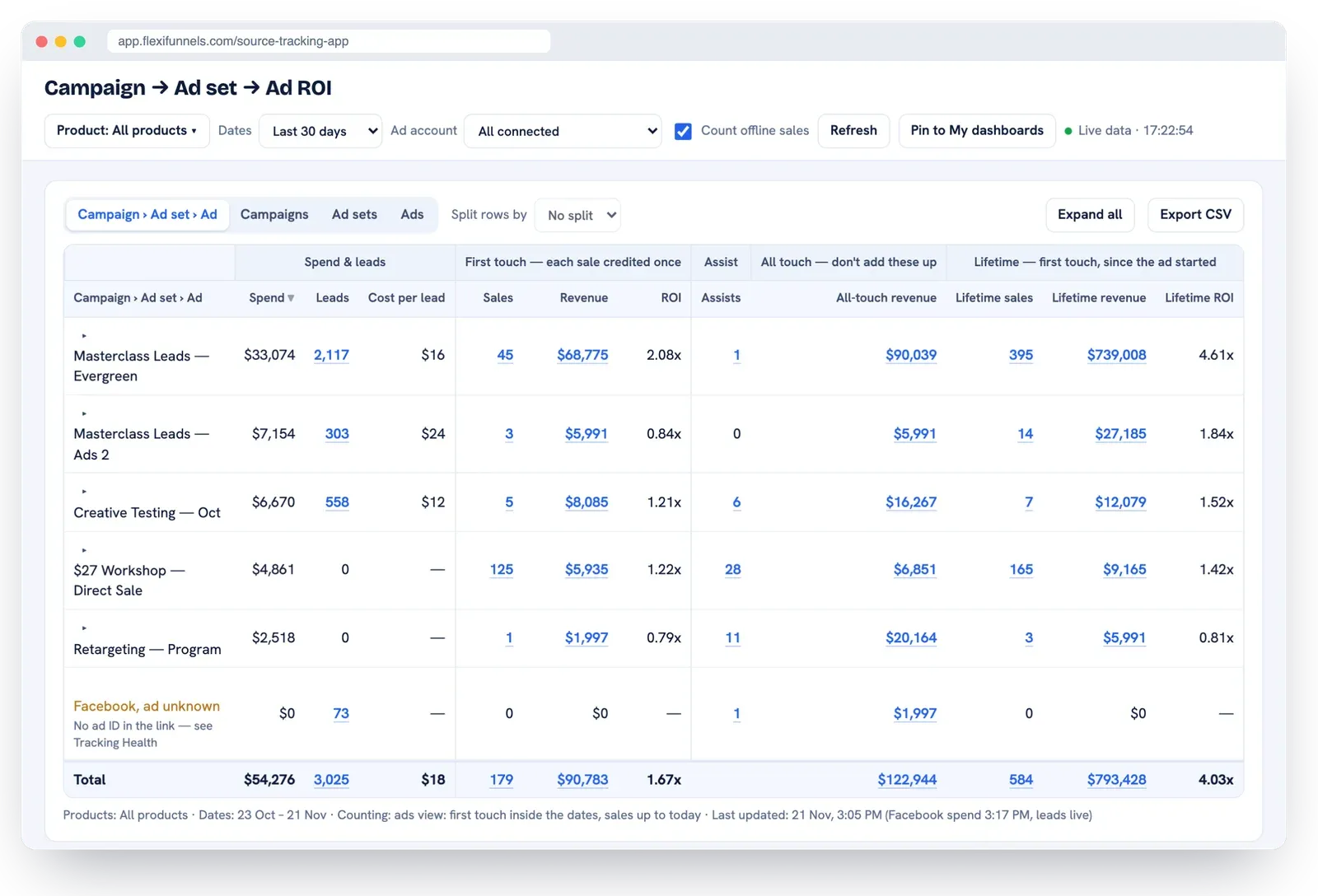
Campaign → Ad set → Ad ROI: spend, leads, sales, revenue, ROI and profit for every ad.
Lifetime ROI: the first sale is the small money
Lifetime ROI credits every later purchase, upsell and renewal back to the ad that first brought the buyer, across all your products. It shows which ads build your business, not just which ads win the first sale.
Ad C, step by step | What happens | ROI |
|---|---|---|
First sale | Ad C brings 6 buyers of your $1,997 program | 6.7x |
Upsell | 2 of them buy your high-ticket program | rising |
Renewals | All 6 stay in your monthly membership | rising |
Lifetime | Every payment credited back to Ad C | 21.6x |
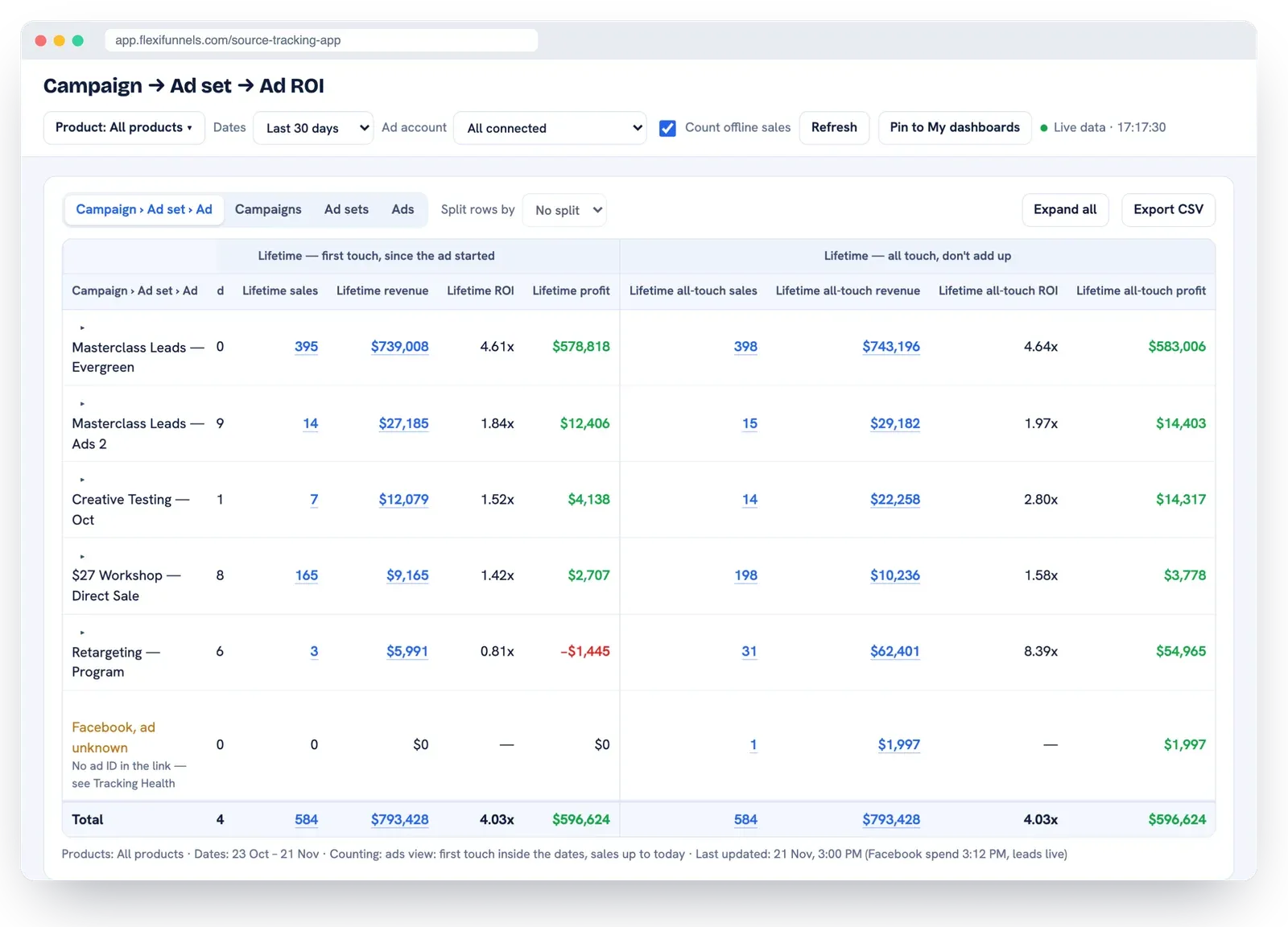
Lifetime ROI per campaign, with first-touch and all-touch columns side by side.
Sale Trail: every buyer, and every click before they paid
Open any sale and see the full story. Which ad they clicked first, which ads helped, how many days they took, and how the match was made.
Credited ad (first touch) and the date of the first click.
Assists: the other ads they clicked before paying.
Days to convert, new or repeat buyer, and how they paid.
Matched on email or phone, so a phone click and a laptop payment still join up.
Search any buyer, email, phone or order, and export to CSV.
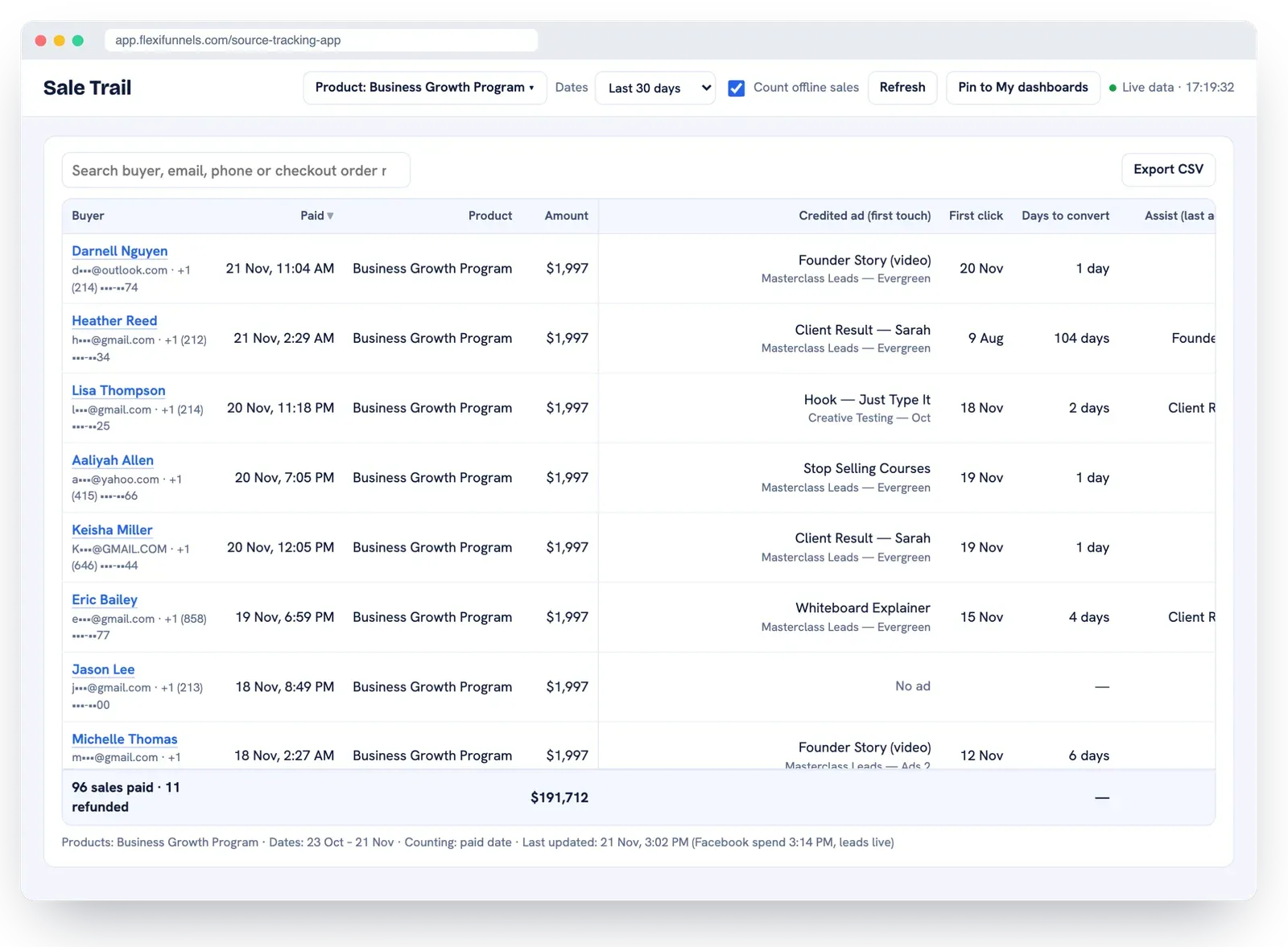
Sale Trail: every sale, the ad that got the credit, and the clicks that helped.
Offline sales: every sale counts, not just checkout
A lot of money is paid outside the checkout. Bank transfers and wires, card payments over the phone, part payments and payment plans, cash, custom payment links, and sales closed on a call. Bring them in, and each one is credited to the ad that first brought the buyer.
Checkout sales: read live from your FlexiFunnels checkout, with refunds and renewals.
Upload a file: one sheet, many products, each row names its Product ID.
Connect a Google Sheet: new rows are read every 15 minutes.
Webhook: your other system sends each sale or refund the moment it happens.
Sale, Refund or Delete rows. A part refund lowers the revenue, a full refund cancels the sale.
No double counting: the same row uploaded twice counts once.
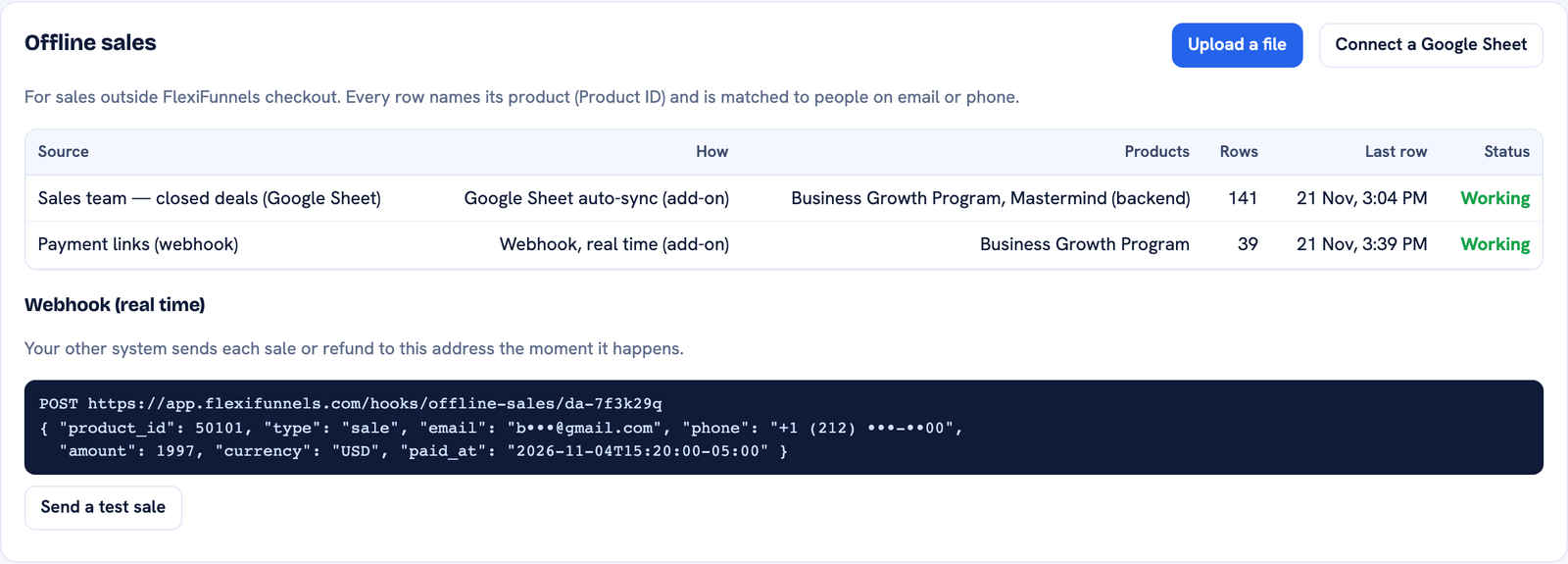
Three ways to bring in offline sales: file upload, Google Sheet or webhook.
Leads by Source and Lead Quality: know which leads buy
Paid ads, organic posts, email, SMS, WhatsApp, reels, YouTube videos, stories and DMs: every lead is counted under its source. Then you see which answers on your form turn into buyers.
Leads by Source for every channel, by day, week or month.
Organic and paid side by side, judged by the sales they bring.
Every UTM tag kept, each in its own column.
Lead Quality: pick a form question and see leads, buyers, lead-to-sale rate and revenue for each answer.
Qualified leads and cost per qualified lead across your dashboards.
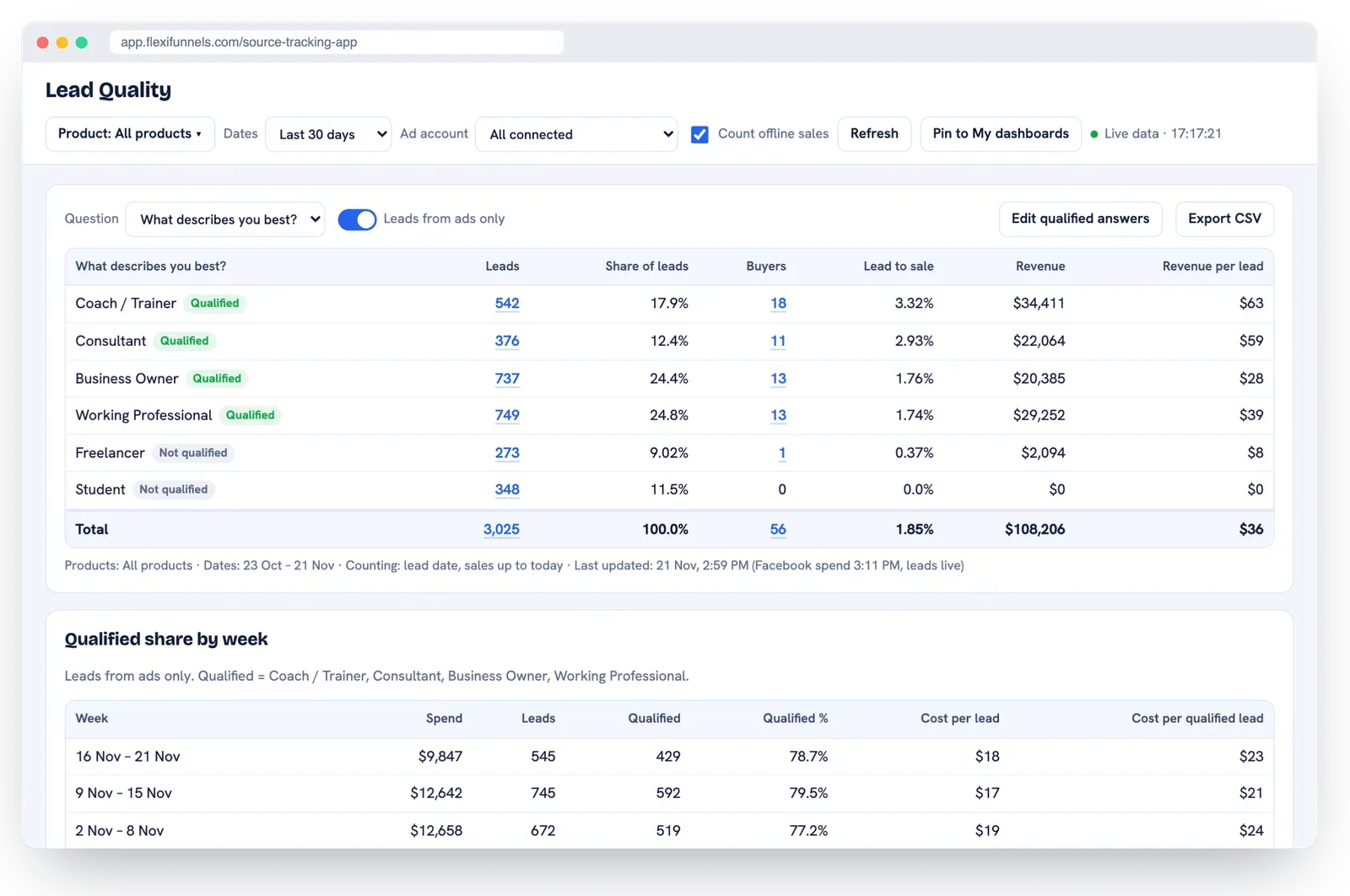
Lead Quality: which form answers turn into buyers, and how much revenue each brings.
Tracking Health: catch broken tracking before you lose data
An ad whose link is missing its tracking tags will always show zero sales. Tracking Health finds those ads and gives you the exact text to paste.
Ad link check for every active ad, with one-click "Copy fix".
Connection status for Facebook, your leads and orders, Google Sheet and webhook.
Buyers never seen as a lead, and sales matched to the visit that paid.
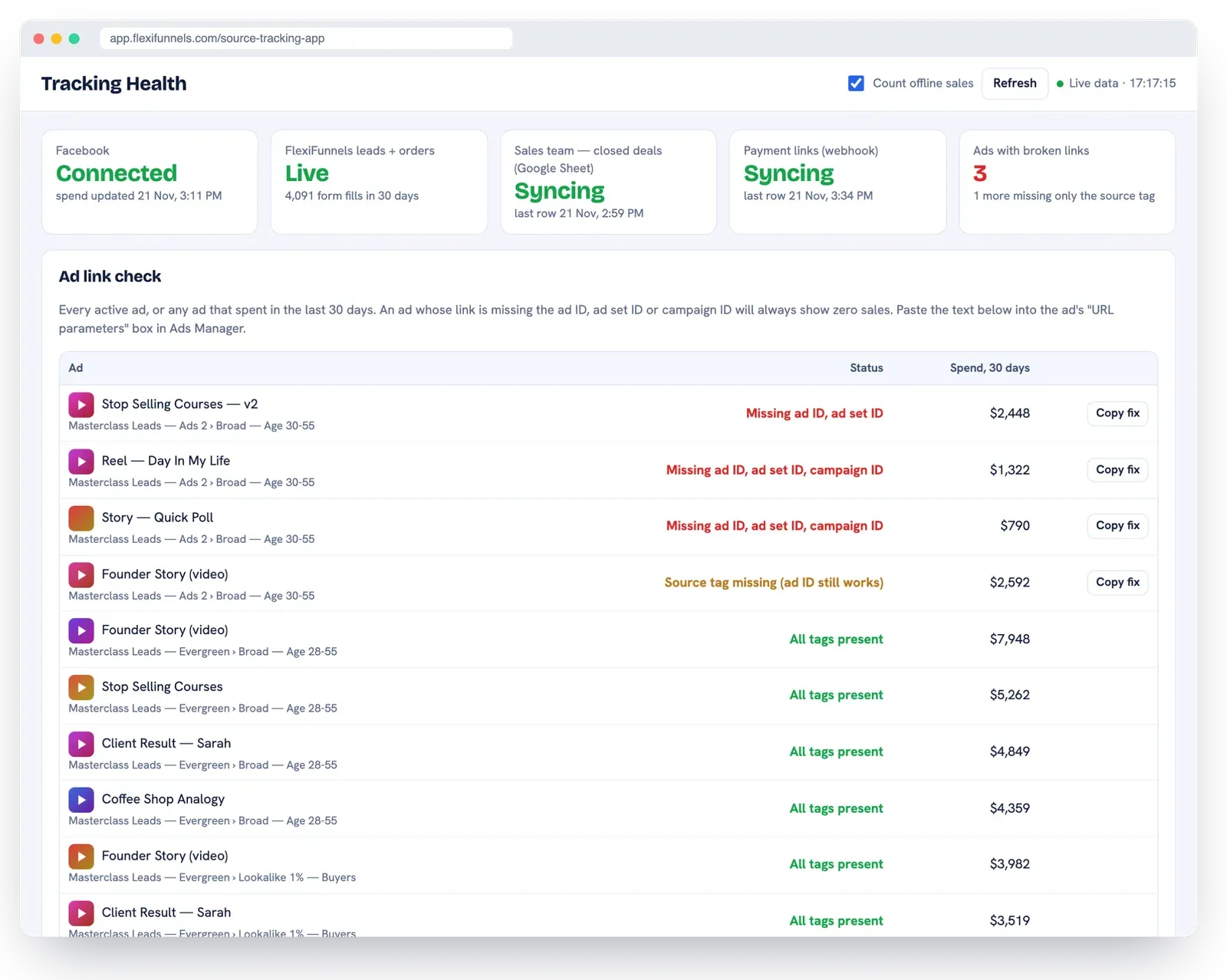
Tracking Health: ads with missing tags, each with a ready-to-paste fix.
Ask your data: questions in plain language, in your language
Type a question the way you'd ask your team, in plain English (other languages work too). You get the answer back with the table behind it.
"What's my ROI this month?"
"How are my ads doing today?"
"Which ads spent money with no sales?"
"Make me a dashboard of cost per lead by ad today"
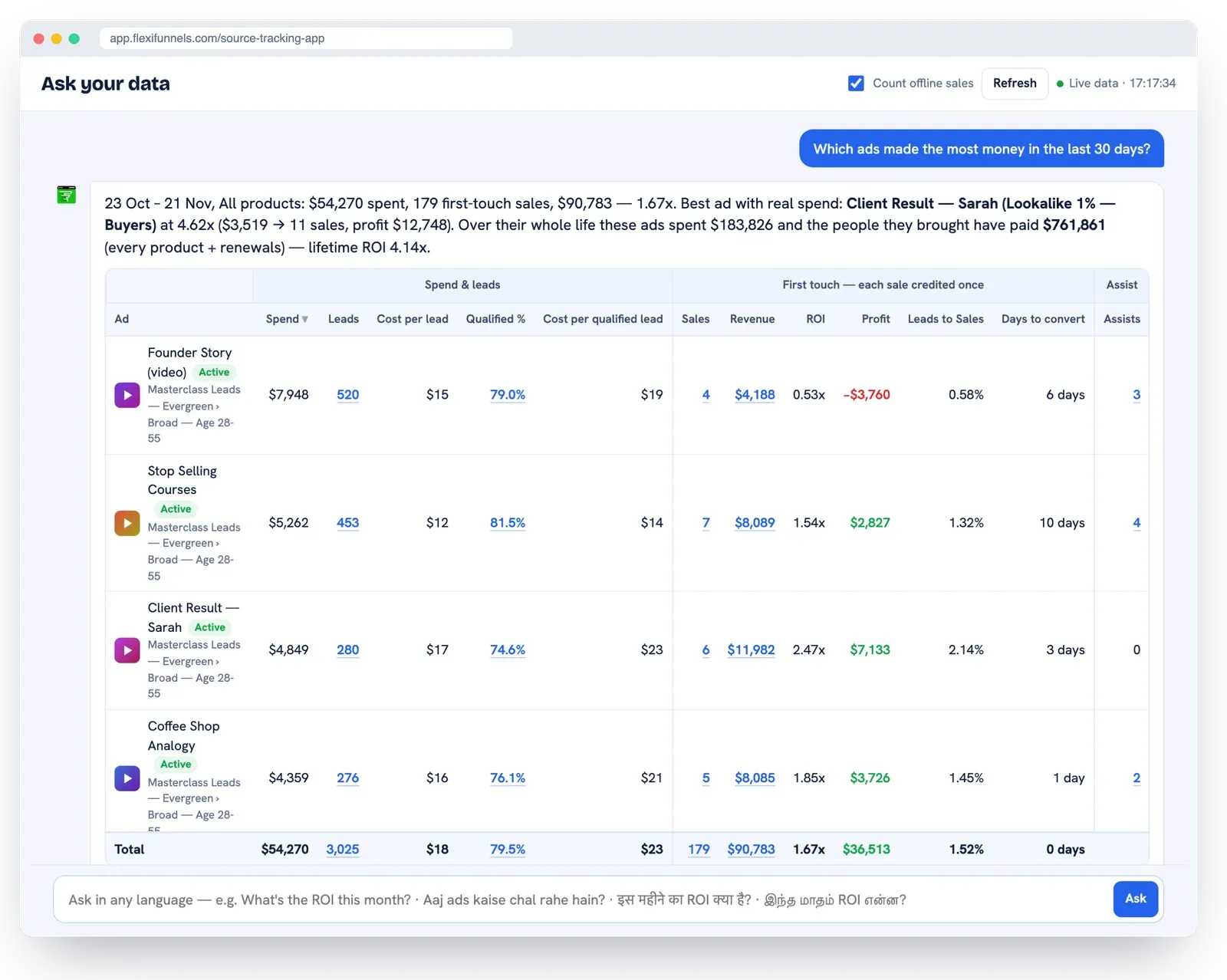
Ask your data: plain-language questions answered with the numbers behind them.
Custom dashboards: build your own, by asking
Ask for the view you want, like "CPL of my active ads, last 7 days", and pin it. Or pin any screen with its dates, products and ad accounts. Pinned dashboards update live, open with one click and export to CSV.
How Source Tracking raises your ROI: 4 levers, with the maths
Source Tracking raises ROI without raising ad spend. It shows you which ads to cut, which to scale and which to keep feeding, and it sends real buyers back to your ad accounts so they find more of them. The numbers below are examples.
Lever 1: judge ads by money, not cost per lead
The ad with the cheapest leads is often the one that sells nothing. Example: a $1,997 program.
Ad | Spend | Cost per lead | Sales | ROI |
|---|---|---|---|---|
Ad A | $1,200 | $8 | 0 | 0.0x |
Ad B | $1,500 | $15 | 3 | 4.0x |
Ad C | $1,800 | $25 | 6 | 6.7x |
Cost per lead tells you to keep Ad A and pause Ad C. Source Tracking shows Ad C returns over 6x and Ad A returns nothing. (More on why cost per lead misleads in our guide to funnel metrics that matter.)
Lever 2: stop feeding the ads that never sell
You don't spend a dollar more. You just stop guessing.
Same budget | Example |
|---|---|
Monthly ad spend | $30,000 |
Spent on ads with zero sales (3 in 10) | $9,000 |
Moved to Ad C, even at half its ROI | 3.35x |
Extra revenue a month | +$30,150 |
Extra revenue a year, zero extra spend | $361,800 |
Lever 3: find the 20x ads hiding behind 6x first sales
With Lifetime ROI, Ad C's first-sale ROI turns out to be far higher once upsells and renewals are credited back. Put real money behind it, even assuming its ROI halves as you scale.
Scaling Ad C | Example |
|---|---|
First-sale ROI → lifetime ROI | 6.7x → 21.6x |
Monthly spend on Ad C | $20,000 |
Lifetime ROI, halved as you scale | 10.8x |
Lifetime profit from each month's spend | $196,000 |
Profit from one year of spend | $2.35M |
Lever 4: feed your ad accounts real buyers, so they find more of them
What you send back to your ad accounts decides who they show your ads to next. Facebook, Google, TikTok and the other platforms each have an offline-sales connection, a conversions API (see Meta's Conversions API documentation). But it only works when something feeds it.
What most ad accounts are fed today | What FlexiFunnels feeds them |
|---|---|
Signals from cheap leads | Every real purchase, checkout and offline, sent to all your ad accounts |
Signals from leads who never buy | Each purchase matched to the ad that brought the buyer |
Nothing from bank transfer, part-payment or cash sales | Bank transfers, part payments and cash sales included |
Lookalikes built from registrants | Buyers synced into custom audiences, so lookalikes are built from real buyers |
Change the signal, and the ad account starts picking better people. We've seen it across millions in ad spend.
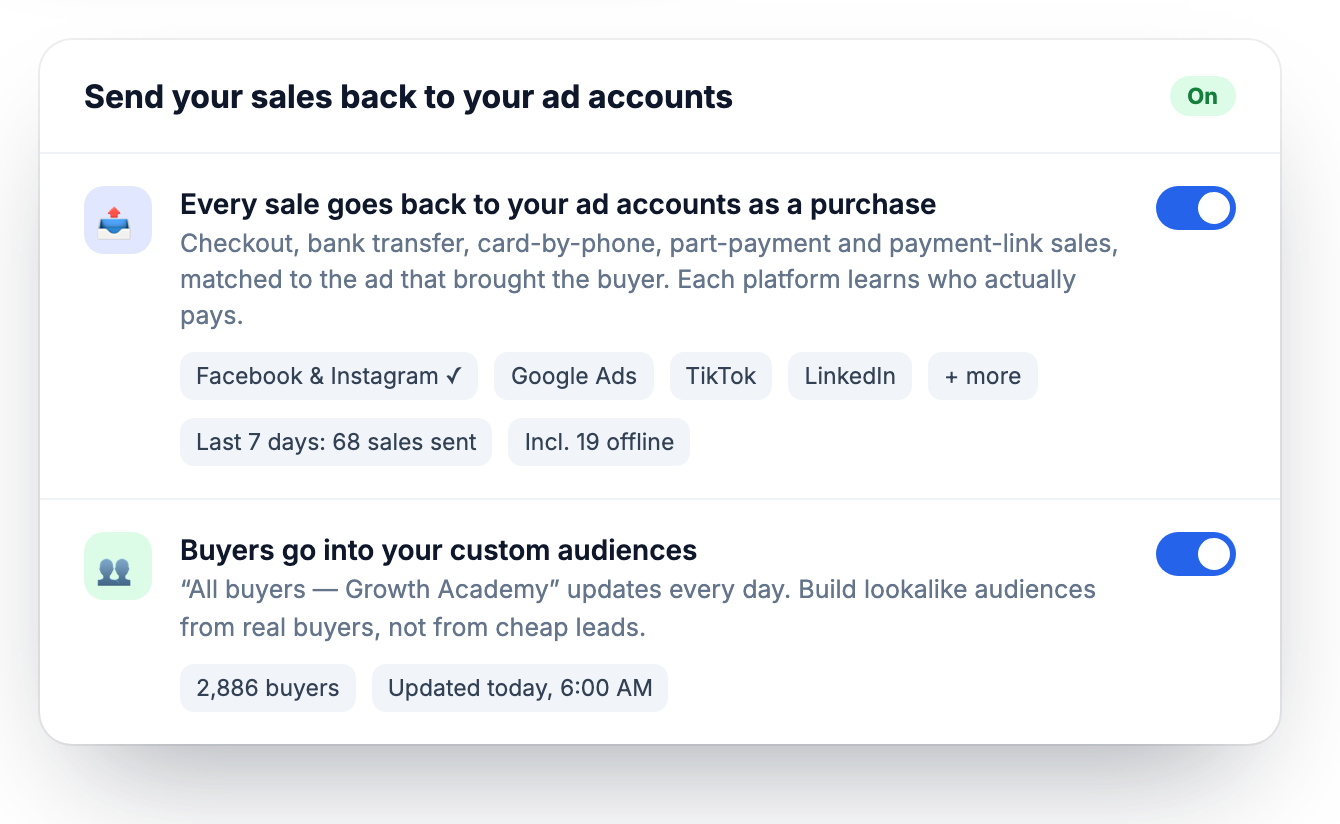
Real purchases sent back to your ad accounts, and buyers synced into custom audiences.
Example maths only, not a promise of earnings. Your results depend on your ads, offer and market.
What does "15% more sales" mean?
Same ad spend, 15% more sales. Source Tracking shows you which ads really bring buyers and which only bring cheap leads. So you move money from the ads that never sell to the ones that do, and you scale the ads that keep paying through upsells and renewals.
Your ads grow, or you don't pay: the 30-day guarantee
Connect your ad accounts, tag your ads and let Source Tracking show you which ads really sell. If, within 30 days, it doesn't help you get more sales from the same ad spend, email us and we'll refund 100% of your payment. No forms. No hoops. No arguments.
Try FlexiFunnels here, backed by the Source Tracking guarantee.
Ad platform reports vs FlexiFunnels Source Tracking
What you need to know | Ad platform reports | FlexiFunnels Source Tracking |
|---|---|---|
Leads hidden by iPhone privacy, Safari, Brave or ad blockers | Not counted | Counted from your own pages |
Checkout sales when the pixel didn't fire | Missed | Read live from the checkout |
Bank transfer, wire, cash and payment-link sales | Never seen | File, Google Sheet or webhook |
Sales more than 7 days after the click | Not credited by default | Credited to the first ad, any time |
Upsells and renewals by the same buyer | Not linked to the ad | Lifetime ROI per ad |
Organic, email, SMS, WhatsApp, reels and DMs next to paid ads | Each platform sees only its own ads | One report for every channel |
Profit and ROI per ad, after refunds | Not available | Every ad, every day |
First touch vs all touch: which ad gets the credit?
FlexiFunnels Source Tracking credits each sale to the first ad the buyer clicked (first touch), so every sale is counted once. Every other ad they clicked before paying is shown as an assist, and all-touch numbers are shown separately.
First touch answers the question that matters most for scaling: which ad found this buyer? All touch shows which ads helped close them, such as a retargeting ad or a webinar reminder. You see both, and you never double-count revenue.
Who is Source Tracking for?
If you run ads to get a sale, a booking, an appointment or an admission, Source Tracking shows which ad really brought it.
Coaches and course creators: webinar funnels, sales calls and payment plans. See which ad filled the webinar that sold, even when buyers pay days later.
Communities and memberships: monthly renewals credited back to the first ad, so Lifetime ROI shows which ads bring members who stay.
Digital products: checkout sales, bumps and repeat orders, matched to the ad or channel that brought each buyer.
Services and high-ticket offers: sales closed on calls and paid by bank transfer, card or part payments, synced from a Google Sheet or webhook.
Software and subscriptions: first payment as the sale, renewals as lifetime revenue on the ad that won the customer.
Clinics and appointments: dentists, salons, physios and consultants. See which ad brought the booked call and the treatment paid for.
Admissions and education: trace each enquiry to the ad, then to the admission fee, even months later.
Real estate: enquiry, site visit, booking amount. Know which ad brought the buyer who booked.
Events: early-bird, VIP and group tickets, credited to the ad that filled the seats.
Agencies: show clients which ads actually sell, not just which ones get cheap leads.
Organic-first creators: reels, YouTube videos, stories and DMs side by side, so you know which content sells, not just which gets views.
How to set up Source Tracking in FlexiFunnels (for customers)
Already on FlexiFunnels? Your leads and checkout sales are already in your account. Source Tracking connects them to your ads. Here's the order to do it in:
Open Source Tracking inside your FlexiFunnels account and go to Connections.
Connect Facebook (read-only) and choose the ad accounts that should count in your reports.
Copy the tracking line into the URL parameters of every active ad. Tracking Health shows any ad that is missing it, with a "Copy fix" button.
Tag your other links: add a source tag to email, SMS, reel, DM and WhatsApp links.
Set your products as one-time or subscription, so renewals are counted correctly.
Bring in offline sales by file, Google Sheet or webhook. Leave checkout sales out, because FlexiFunnels already counts them.
Check the Daily Ads Check every morning. Cut the ads that spent with no sales, and put more behind the ads with the best lifetime ROI.
Not a customer yet? See FlexiFunnels here. Source Tracking comes with your pages, funnels, checkout and courses in one account.
Is Source Tracking a Hyros or Cometly alternative?
Yes. FlexiFunnels Source Tracking does the same core job as standalone attribution tools like Hyros or Cometly: it traces sales to ads beyond what the ad platforms report. The difference is that it lives inside the same FlexiFunnels account as your pages, forms, checkout and courses.
Because the leads and sales are already in FlexiFunnels, there's no extra script to install on your checkout, no separate login, and no second tool to keep in sync. Standalone tools may suit you if your pages and checkout run on many different systems. If you sell through FlexiFunnels pages and checkout, Source Tracking is built in. For a full side-by-side, read our Hyros alternative comparison.
Grow with affiliates too
Affiliates are a channel in Source Tracking, next to your ads, email and social posts. If you want other people selling for you, read our guide to affiliate management in FlexiFunnels. It covers commissions, the three attribution rules, Refer & Earn for your buyers, and payouts. New to the platform? Start with what FlexiFunnels is and what it costs.
Do it by chatting: the FlexiFunnels MCP
Everything in this guide can also be done just by chatting. The FlexiFunnels MCP connects ChatGPT, Claude or Gemini to your FlexiFunnels account. You ask in plain words, review what it is about to do, approve, and it's done. No dashboards to dig through.
"Which of my ads made money last week, and which spent with no sales?"
"Show me the sale trail for the buyer sarah@example.com."
"Compare first-sale ROI and lifetime ROI for my top five ads this month."
Prefer to stay in your dashboard? Flexi Genie is the same chat, built right into FlexiFunnels. See how the FlexiFunnels MCP works, or read the full FlexiFunnels MCP guide.
Frequently asked questions
What is Source Tracking in FlexiFunnels?
Source Tracking is the marketing attribution app inside FlexiFunnels. It connects your ad accounts, leads, checkout sales and offline payments, matches each buyer by email or phone, and credits every sale to the ad or channel that first brought them. You see real ROI, profit and lifetime ROI for every campaign, ad set and ad.
Where do I find Source Tracking?
Inside your FlexiFunnels account, in the Source Tracking app. It has your dashboards (ROI Overview, Campaign ROI, Creative ROI, Daily Ads Check, Leads by Source, Lead Quality, Sale Trail, Tracking Health), My dashboards, Ask your data, and the Connections, Products and Settings screens.
Which ad platforms does Source Tracking support?
Facebook and Instagram ads are live. Google Ads, ChatGPT Ads, YouTube, TikTok, LinkedIn, Microsoft, Snapchat, Pinterest and X ads are coming, all in the same reports. Organic and owned channels are tracked from the source tags on your links.
Can I track email, SMS, reels, DMs and WhatsApp?
Yes. Add a source tag to the links you share on any channel: email, SMS, social posts, reels, YouTube videos, stories, DMs, WhatsApp and communities. Every lead and sale from that link is credited to that channel, next to your paid ads.
Can FlexiFunnels change or pause my ads?
No. The ad account connection is read-only. FlexiFunnels reads your spend, ad names and each ad's link settings. It can never create, change, pause or spend on an ad.
What do I need to put in my ads?
One line of tracking tags in each ad's URL parameters. Tracking Health lists any ad that is missing it, with the exact text to copy and paste. No developer is needed, and nothing changes on your pages or checkout.
What if the buyer pays weeks later, or on another device?
The buyer is matched by email or phone number. So a click on the phone and a payment on the laptop, days or weeks later, still join up to the right ad. That's how Source Tracking credits sales that ad platforms miss after their attribution window closes.
How do I add sales made outside my checkout?
Upload a file, connect a Google Sheet (read every 15 minutes) or send each sale by webhook. Each row names its Product ID. Leave checkout sales out, because FlexiFunnels already counts them. A part refund lowers the revenue and a full refund cancels the sale.
What is Lifetime ROI?
Lifetime ROI credits every later purchase, upsell and renewal from a buyer back to the ad that first brought them, across all your products. It shows which ads build your business over time, not just which ads win the first sale.
Why does Facebook show fewer purchases than my sales?
Facebook can only credit what its pixel and cookies see. iPhone tracking choices, Safari and Brave protections, ad blockers, device switching, payments made off your page and sales after the 7-day click window all hide purchases. Source Tracking counts them from your own records instead.
Can I use more than one ad account or currency?
Yes. Connect several ad accounts and switch each one on or off for your reports. Sales in other currencies are shown in their own currency, never silently converted, so every currency stays clean.
Can I ask questions about my ads in plain language?
Yes. Ask your data answers questions like "Which ads spent money with no sales this week?" with the answer and the table behind it, in English or the language you ask in. You can pin any answer as your own dashboard.
How does the Source Tracking guarantee work?
Use it for 30 days. If Source Tracking doesn't help you get more sales from the same ad spend, email us and we'll refund 100% of your payment. No forms, no hoops, no arguments.
Know which ads make you money, starting this week
Every lead, every sale and every renewal, traced back to the ad or channel that brought the buyer. Trusted by 23,000+ businesses that run their pages, checkout and sales on FlexiFunnels.
Not a customer yet: try FlexiFunnels here (start your 14-day free trial, no credit card needed), see FlexiFunnels here, or book a free 1:1 consultation.
Already a customer: open Source Tracking in your account and connect your ad account today.
See every screen: the full Source Tracking feature page.