To connect a domain to a website, you point your domain's DNS records at the service that hosts your pages. A subdomain such as go.yourbrand.com normally uses a CNAME record, and a root domain such as yourbrand.com normally uses an A record. Once the records are verified, visitors see your pages at your own address, secured with SSL.
FlexiFunnels is the platform that lets you set this up, and build and run your whole business, just by chatting. Tell Flexi Genie (built into the dashboard, see how it works) or ChatGPT, Claude or Gemini (through the FlexiFunnels MCP) what you want, approve it, and it is built. For example: "Put my webinar funnel on go.mybrand.com." FlexiFunnels' own integrations page gives that kind of request as an example. FlexiFunnels is trusted by 23,000+ businesses, and this guide shows both routes: connecting your domain by hand, and letting the chat do the work. It also covers SSL, hosting speed, how many domains you get and what to check when something does not connect.
See FlexiFunnels here · Start your 14-day free trial (no credit card required, every feature unlocked, 3 AI Page Builder credits included)
What does it mean to connect a domain to a website?
It means telling the internet that your domain name should show the pages stored on your hosting platform. You do that by adding DNS records at the company where you bought the domain, which is called the registrar.
The Domain Name System works like a phone book for the web. Wikipedia's overview of the Domain Name System describes it as the naming system that translates human-friendly names into the numeric addresses computers use. When you connect a domain, you add an entry to that phone book that points your name at your page builder.
Why bother with your own domain instead of a platform address?
Trust. Visitors are more comfortable paying or sharing an email address on a brand they recognize.
Control. The address belongs to you, so you can move platforms without losing it.
Branding. Agencies can show clients their own address with no platform branding.
Clean links. Short, readable addresses are easier to say, print and put on ads.
Should you use a subdomain or a root domain?
Use a subdomain for funnels and landing pages, and a root domain if you want the whole brand address to show your pages. Both work in FlexiFunnels.
FlexiFunnels' integrations page says you can use a subdomain or your main domain for any project. Subdomains connect with a CNAME record (the example given is go.yourbrand.com), and main domains connect with an A record. For background on the record type, see Wikipedia's page on the CNAME record.
Subdomain (go.yourbrand.com) | Root domain (yourbrand.com) | |
|---|---|---|
DNS record type in FlexiFunnels | CNAME | A record |
Best for | Funnels, webinars, checkouts, campaigns | A main brand address |
Keeps your existing website | Yes, the main site can stay where it is | No, the root address points to the new place |
Risk of breaking something | Low | Higher, since it changes where the main address goes |
Typical example | go.mybrand.com, learn.mybrand.com | mybrand.com |
If you already have a website on your root domain, start with a subdomain. It lets you add funnels without touching the main site.
How do you connect a domain to a website in FlexiFunnels?
You add the domain in your account settings, create the DNS record at your registrar, click verify, and wait for the status to show as secured. The steps below follow FlexiFunnels' own domain screen.
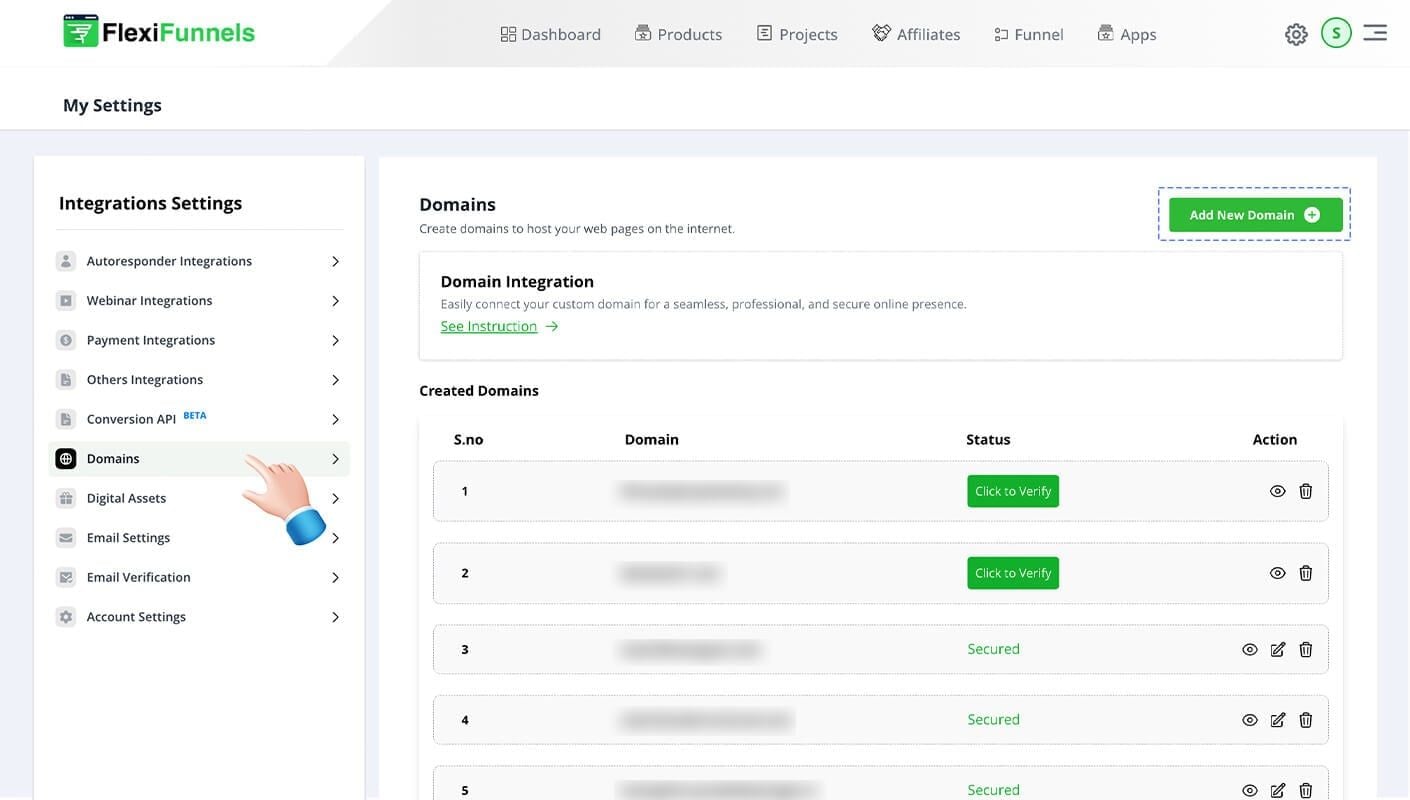
The FlexiFunnels Domains screen under Integrations Settings, with Add New Domain and each domain's status (Click to Verify, then Secured). Domain names are blurred in the original.
Step 1: Buy or choose your domain
Register a domain with any registrar, or use one you already own. If it already points to another site, decide whether to use a subdomain so you do not disturb it.
Step 2: Add the domain in FlexiFunnels
In your account, open your settings, then Integrations Settings, then Domains. The screen says "Create domains to host your web pages on the internet." and has an Add New Domain button. Click it and enter your domain or subdomain.
Step 3: Create the DNS record at your registrar
Open the DNS settings at your registrar. For a subdomain, add a CNAME record. For a main domain, add an A record. The Domains screen includes a "See Instruction" link under "Domain Integration", so use the exact values it shows rather than copying them from this guide. We do not list the record values here because they come from your account.
Step 4: Click to verify
Back in FlexiFunnels, each new domain shows a "Click to Verify" button. Click it. If the records have not spread across the internet yet, wait and try again. DNS changes can take some time to appear everywhere, so a failed check straight after you save the record is normal.
Step 5: Wait for the secured status
When verification succeeds, the screen shows the domain as "Secured". FlexiFunnels says SSL is added automatically for connected domains, so you do not buy or install a certificate.
Step 6: Put your funnel or page on the domain
Choose the connected domain for your project, funnel or page, then publish. The public pages do not give the exact menu names for this last step, so look for the domain option in your project or funnel settings, or ask Flexi Genie to do it for you (see the chat section below).
See FlexiFunnels integrations and domain setup
Is SSL included with a custom domain?
Yes. FlexiFunnels says every page and every custom domain gets free SSL automatically. SSL is what puts the padlock in the browser and moves your address from http to https.
Under the hood, SSL today means Transport Layer Security. Wikipedia's TLS article explains that it encrypts the connection between a visitor's browser and your server, so form entries and payment details cannot be read on the way. For a page that takes email addresses or payments, this is not optional.
FlexiFunnels' integrations page also contrasts this with tools where SSL is "set up and renewed by you." With FlexiFunnels there is nothing to renew by hand.
How fast are pages on your own domain?
FlexiFunnels says published pages load in under one second. It states that pages are served through Cloudflare's global CDN with Argo Smart Routing, with edge caching included at no extra cost.
A content delivery network keeps copies of your pages on servers around the world and serves each visitor from a nearby one. Wikipedia's CDN article describes the idea in more detail. For landing pages, that means visitors in Sydney or London do not wait for a single faraway server.
What else does FlexiFunnels say about hosting?
The platform is built on Amazon Web Services, with an auto-scaling queue for lead and sale processing.
FlexiFunnels says its hosting was load-tested at 100,000+ visitors in a one-minute window.
The pages describe fully redundant hosting with auto-scaling for traffic spikes, even during viral launches.
All pages are protected from denial-of-service attacks automatically.
Two honest notes. First, these are FlexiFunnels' own statements, and the public pages do not give an uptime percentage or a service-level agreement for the Professional and Premium plans (Enterprise lists an enterprise SLA). Second, speed also depends on what you put on the page. Large uncompressed images and heavy scripts slow down any host. Google's Web Vitals guidance explains the loading, interactivity and layout-stability signals worth measuring, and you can test your own page with a free speed tool before you send ad traffic.
How many custom domains do you get, and what do extra ones cost?
Both FlexiFunnels plans include 9 custom domains. Extra domains cost $20 per domain per year beyond those 9.
Item | Professional ($447/year) | Premium ($697/year) | Enterprise |
|---|---|---|---|
Custom domains included | 9 | 9 | Unlimited |
Extra domains | $20 per domain per year | $20 per domain per year | Not needed |
Monthly visits included | 100,000 | 300,000 | Custom |
Pages | 100 | 300 | Custom |
Sales funnels | 50 | 200 | Custom |
SSL on every domain | Included | Included | Included |
Every plan includes every feature; only the usage limits differ. If you pass your visit limit, FlexiFunnels says nothing shuts off and your pages stay live. Extra capacity costs $15 a month for 30,000 more visits, $25 a month for 60,000 more, or $38 a month for unlimited visits. Visits reset at the start of each month.
Can agencies connect clients' domains?
Yes. FlexiFunnels says you can connect clients' domains for their pages, websites and courses with no FlexiFunnels branding. Both plans also include a commercial licence for building pages, funnels and courses for clients, and 9 sub-users with per-module permissions.
That means a client can see pages at their own address, such as book.clientbrand.com, while you manage the build. Remember that each connected domain counts toward your domain limit.
What does a domain setup cost? A worked example
This is a hypothetical example to show the maths. It is not a quote.
Jake runs a small marketing agency with 12 client domains. Both plans include 9 domains, so he needs 12 − 9 = 3 extra domains, which costs 3 × $20 = $60 per year.
His clients together send about 140,000 visits a month to their pages. Professional includes 100,000 visits, so he is 40,000 over. The smallest add-on that covers 40,000 is the $25-a-month plan for 60,000 extra visits. Over 12 months that is $25 × 12 = $300.
On Professional, his yearly total is $447 + $60 + $300 = $807. On Premium, which includes 300,000 visits, he needs no visit add-on: $697 + $60 = $757. In this example, Premium is $50 cheaper ($807 − $757) and also includes more pages and funnels. Your own numbers will differ, so count your domains and monthly visits before you choose a plan. To see your visits, read funnel analytics.
What should you check when a domain will not connect?
Most failures are one of a few common DNS mistakes. These are general DNS tips, not FlexiFunnels-specific rules, so always follow the instructions shown in your account first.
Wrong record type. A subdomain needs a CNAME; a root domain needs an A record. Using the wrong one will not verify.
Typos in the host or value. Copy the values from the instruction screen exactly.
Conflicting old records. If an old A or CNAME record for the same name still exists, remove it so only one points to FlexiFunnels.
www versus non-www. These are different names. Decide which one you want and set up the one you advertise.
Not enough waiting time. DNS changes can take a while to spread. Try verification again later before changing anything.
Wrong place. Make sure you edit DNS where the domain's name servers actually point. If your name servers are at another company, edit the records there.
If it still fails, FlexiFunnels support is available 24/7, with live chat that replies in about three minutes.
Can you send email from your own domain too?
Yes. FlexiFunnels' integrations page lists "your own sending domain for emails" as a feature, so emails can come from your verified domain. For the connection side, see our guide to webhook integration and your email tool's native connection. The public pages do not give the verification steps for the sending domain, so follow the in-app instructions.
Who is this for, and what are the limits?
Connecting your own domain suits anyone who sends traffic to funnels, landing pages, checkouts or courses and wants a professional address. It matters most for agencies, coaches who run ads and course sellers who take payments.
Record values are in your account. The public pages do not list the exact DNS values, so we do not either.
No uptime percentage is published for Professional or Premium. FlexiFunnels lists an enterprise SLA only for Enterprise.
Speed claims are FlexiFunnels' own. Test your own page, since content weight changes results.
Domain limits apply. 9 domains are included on both plans, with $20 per domain per year after that.
The exact click path to attach a domain to a funnel is not on the public pages. Use the in-app tutorials or ask the chat to do it.
Looking for the page itself? See our guides to landing page templates and the checkout page, since both look better and convert better on your own address.
How does a customer switch it on?
If you already have a FlexiFunnels account, custom domains are part of every plan; there is nothing to enable. Open your account settings, go to Integrations Settings, then Domains, and click Add New Domain. Follow the on-screen instruction link, verify, and wait for the Secured status.
Not a customer yet? The plans are Professional at $447 per year and Premium at $697 per year, and both include every feature. The 14-day free trial needs no credit card and unlocks every feature exactly like a paid account. Start your 14-day free trial or book a free 1:1 consultation.
Do it by chatting: the FlexiFunnels MCP
Everything in this post can also be done through the FlexiFunnels MCP. Connect ChatGPT, Claude or Gemini to your FlexiFunnels account, ask in plain words, approve the plan, and it is done. Flexi Genie is the same chat, built into the dashboard (read more). For a full walkthrough, read the FlexiFunnels MCP guide or visit the MCP page.
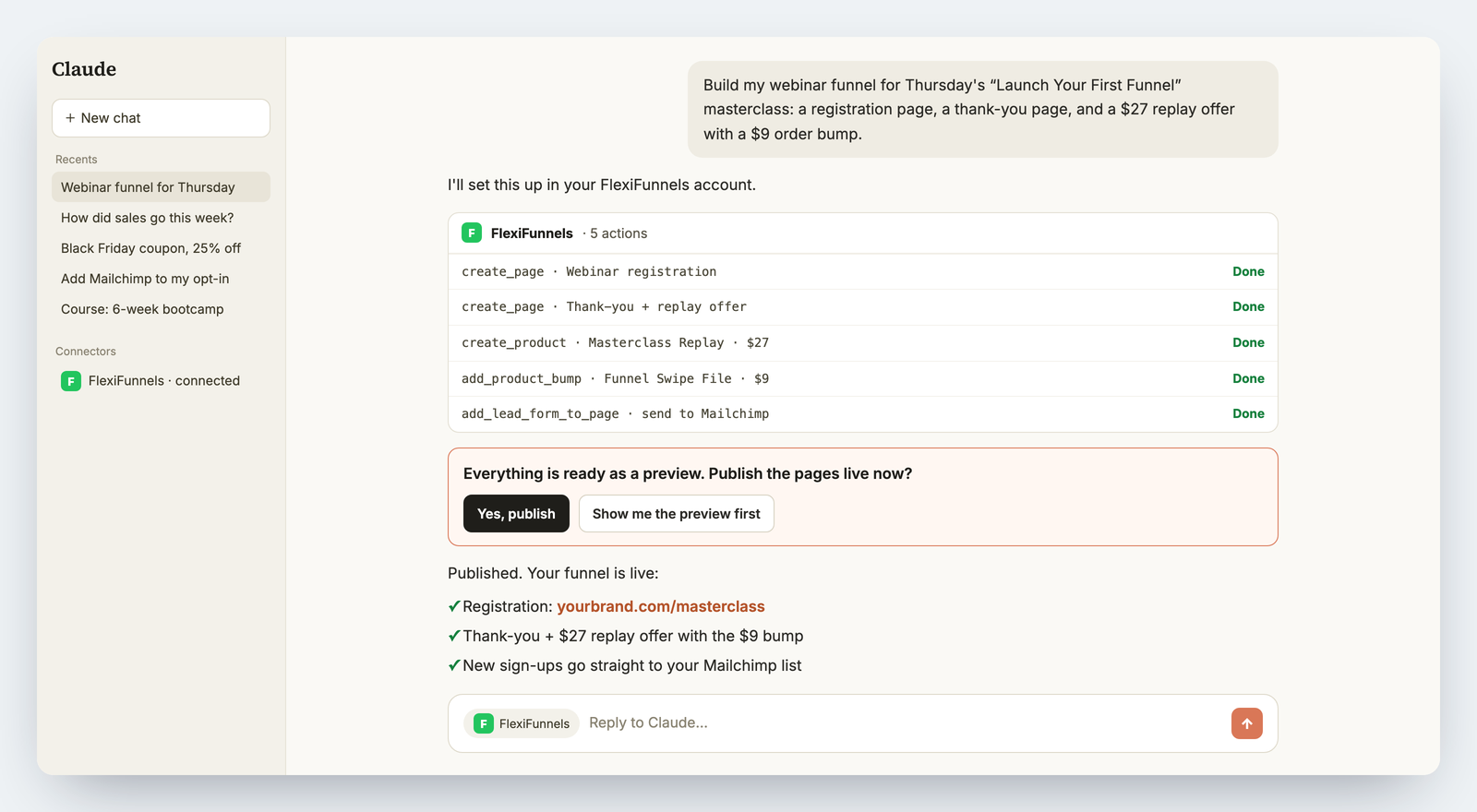
Claude building a funnel through the FlexiFunnels MCP and asking before it publishes (sample from the FlexiFunnels site).
Example prompts for domains and hosting:
"Put my webinar funnel on go.mybrand.com."
"Which of my domains are connected, and which still need verification?"
"Create a funnel for my client's coaching offer and publish it on book.clientbrand.com after I approve."
You still add the DNS record at your registrar, because that is outside your FlexiFunnels account. Flexi Genie and MCP also do not yet support add-to-cart or product variants that change the price.
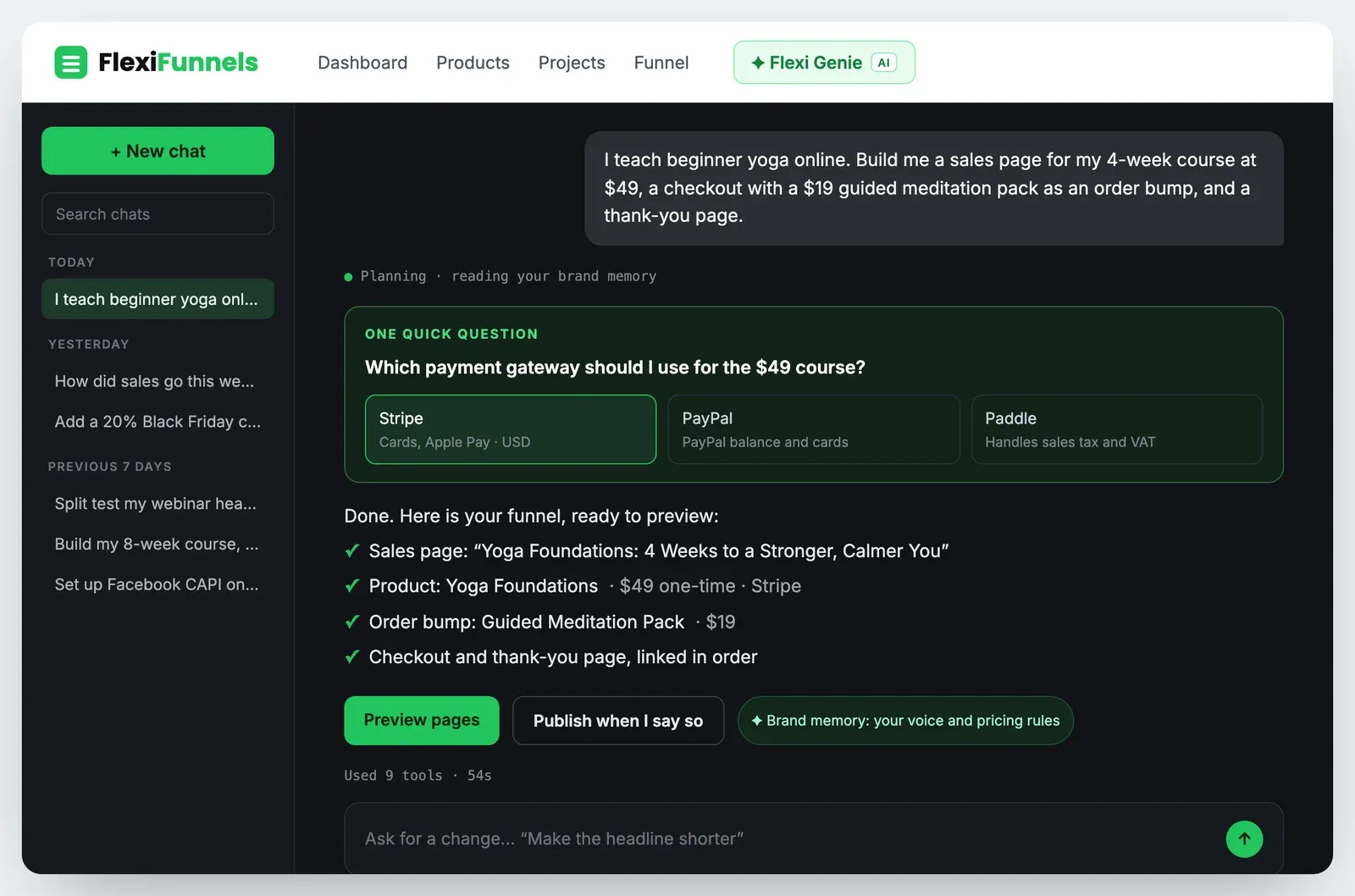
Flexi Genie building a $49 course funnel from one chat message (sample data).
Frequently asked questions
How do I connect a domain to a website?
Add DNS records at your registrar that point the domain at your hosting platform, then verify the connection. In FlexiFunnels, open Integrations Settings, then Domains, click Add New Domain, add the CNAME record for a subdomain or the A record for a root domain, click verify, and wait for the Secured status.
Should I use a CNAME or an A record?
Use a CNAME record for a subdomain such as go.yourbrand.com, and an A record for a root domain such as yourbrand.com. FlexiFunnels follows this rule on its integrations page. The exact record values appear on the instruction screen in your account, so use those instead of values copied from elsewhere.
Does FlexiFunnels include a free SSL certificate?
Yes. FlexiFunnels says every page and every custom domain gets free SSL automatically, and that you do not set up or renew it yourself. SSL moves your address to https and shows the padlock in the browser, which matters for any page that collects emails or payments.
How many custom domains are included?
Both Professional and Premium include 9 custom domains. Extra domains beyond those 9 cost $20 per domain per year. Enterprise has custom pricing and lists unlimited domains. Each client domain you connect as an agency counts toward the limit, so count them before you choose a plan.
Can I connect my clients' domains?
Yes. FlexiFunnels says you can connect clients' domains for their pages, websites and courses with no FlexiFunnels branding. Both plans include a commercial licence for client work and 9 sub-users with per-module permissions, so you can build for clients and keep their addresses on their own brand.
How fast do pages load on FlexiFunnels?
FlexiFunnels says published pages load in under one second, served through Cloudflare's global CDN with Argo Smart Routing. That is FlexiFunnels' own statement, and your results also depend on image size and scripts. Test your own page with a free speed tool before you send paid traffic.
What happens if I go over my monthly visit limit?
Nothing shuts off. FlexiFunnels says your pages stay live. Extra visits cost $15 a month for 30,000 more, $25 a month for 60,000 more, or $38 a month for unlimited visits. Professional includes 100,000 monthly visits and Premium includes 300,000, and visits reset at the start of each month.
Why does my domain say it is not verified?
The usual causes are the wrong record type, a typo, an old conflicting record, or simply not waiting long enough for DNS changes to spread. Check the record against the instruction screen, remove any old record for the same name, wait, and click verify again. If it still fails, FlexiFunnels support is available 24/7.
Can Flexi Genie connect my domain for me?
Genie can put a funnel on your domain, for example when you ask it to place a funnel on go.mybrand.com, as shown on FlexiFunnels' integrations page. You still need to add the DNS record at your registrar. Genie asks before it changes anything and shows a preview first, so you stay in control.
Is my page protected from attacks?
FlexiFunnels says all pages are protected from denial-of-service attacks automatically, and both plans list DDoS-protected pages. It also describes redundant hosting with auto-scaling for traffic spikes. No uptime percentage is published for the Professional and Premium plans, so do not treat this as a guarantee.
Does this work for customers in India?
Yes. FlexiFunnels is a global platform used by 23,000+ businesses. For customers in India, pricing is also offered in INR including GST, and regional gateways and UPI are supported at checkout. Connecting a domain works the same way everywhere, using the same CNAME and A record rules.
Next steps
Choose a subdomain such as go.yourbrand.com, add it under Domains in FlexiFunnels, create the record at your registrar, verify, and publish. If you would rather not click through it yourself, ask the chat. To see everything in one place, see FlexiFunnels here, try FlexiFunnels here with the 14-day free trial, or book a free 1:1 consultation.