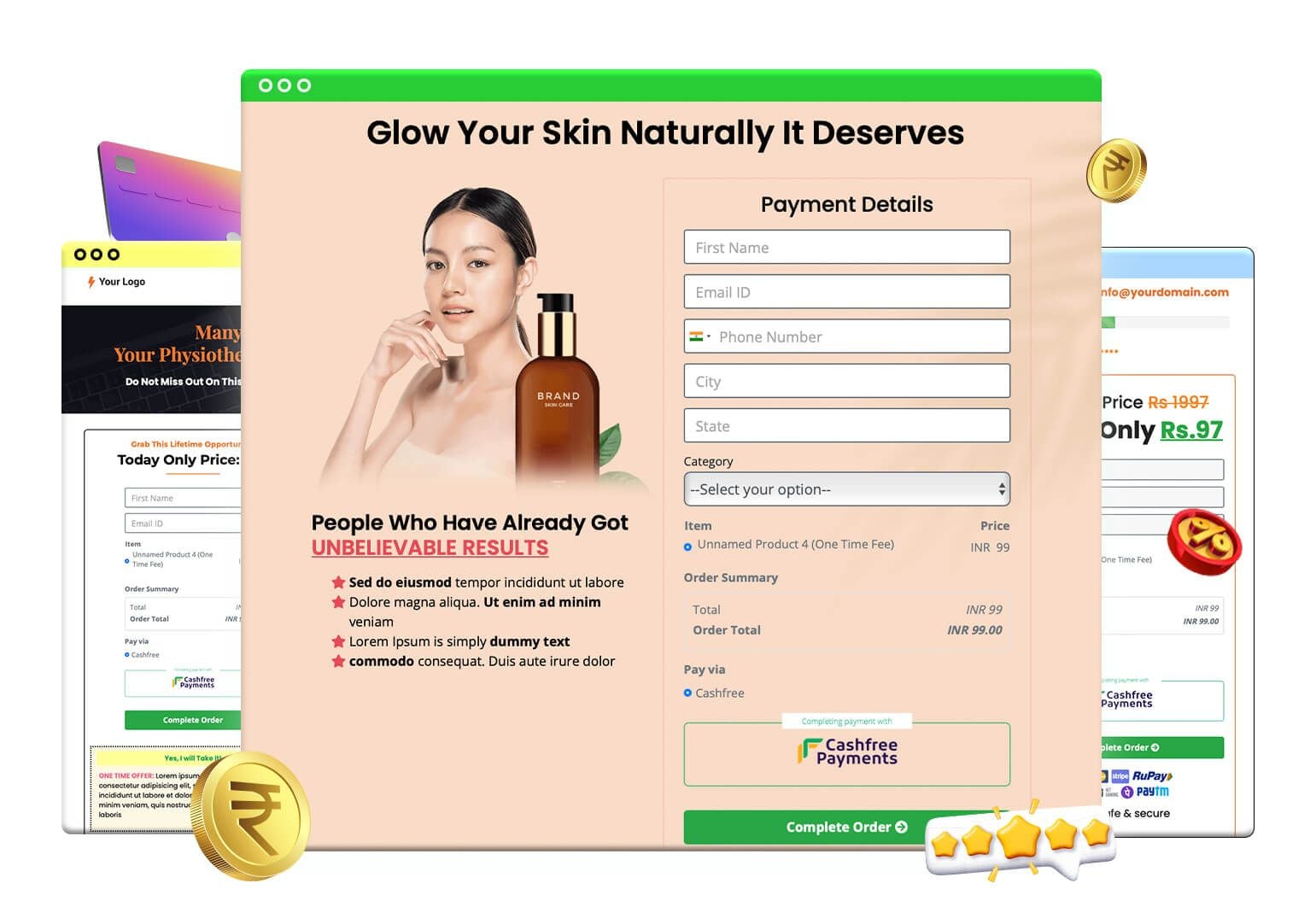
A sales funnel builder is software that lets you connect the pages a buyer sees, from opt-in or sales page to checkout, one-click upsell, downsell and thank-you page, into one tracked path. FlexiFunnels is a sales funnel builder with unlimited upsell and downsell paths, order bumps and per-step analytics built in.
If you sell coaching, courses, services or digital products, this is the part of your business that decides how much each click on your ad is worth. This guide explains what a funnel is made of, how to build one step by step, what the numbers can look like (clearly labelled examples), and where a funnel builder is the wrong tool.
See FlexiFunnels here · Try FlexiFunnels here (start your 14-day free trial, no credit card needed) · Read the FlexiFunnels sales funnels page
What is a sales funnel and why do you need a builder?
A sales funnel is the fixed path a visitor follows from first click to paid order. Every step asks for one small decision: give an email, watch a video, pay. A builder lets you design that path once, so every visitor gets the same tested journey instead of a loose website.
Most small businesses lose money in the gaps. The ad goes to a home page. The home page links to ten places. The buyer pays, sees a plain thank-you message, and leaves. Nothing was offered after the sale, and nobody can say which step lost the most people.
A funnel closes those gaps. The shape is simple:
Attract: an ad, post, email or search result sends traffic to one page.
Capture or pitch: an opt-in page collects a lead, or a sales page makes the offer directly.
Convert: a checkout page takes the payment.
Increase the order: a bump on the checkout and one-click offers after it raise the value of each sale.
Deliver: a thank-you page, an email or a course login gives the buyer what they paid for.
The FlexiFunnels homepage lists a sample flow of landing page, sales page, checkout, upsell, thank-you page and course. Your own version depends on what you sell. A webinar funnel looks different from a $47 ebook funnel, but both are paths with a decision at each step.
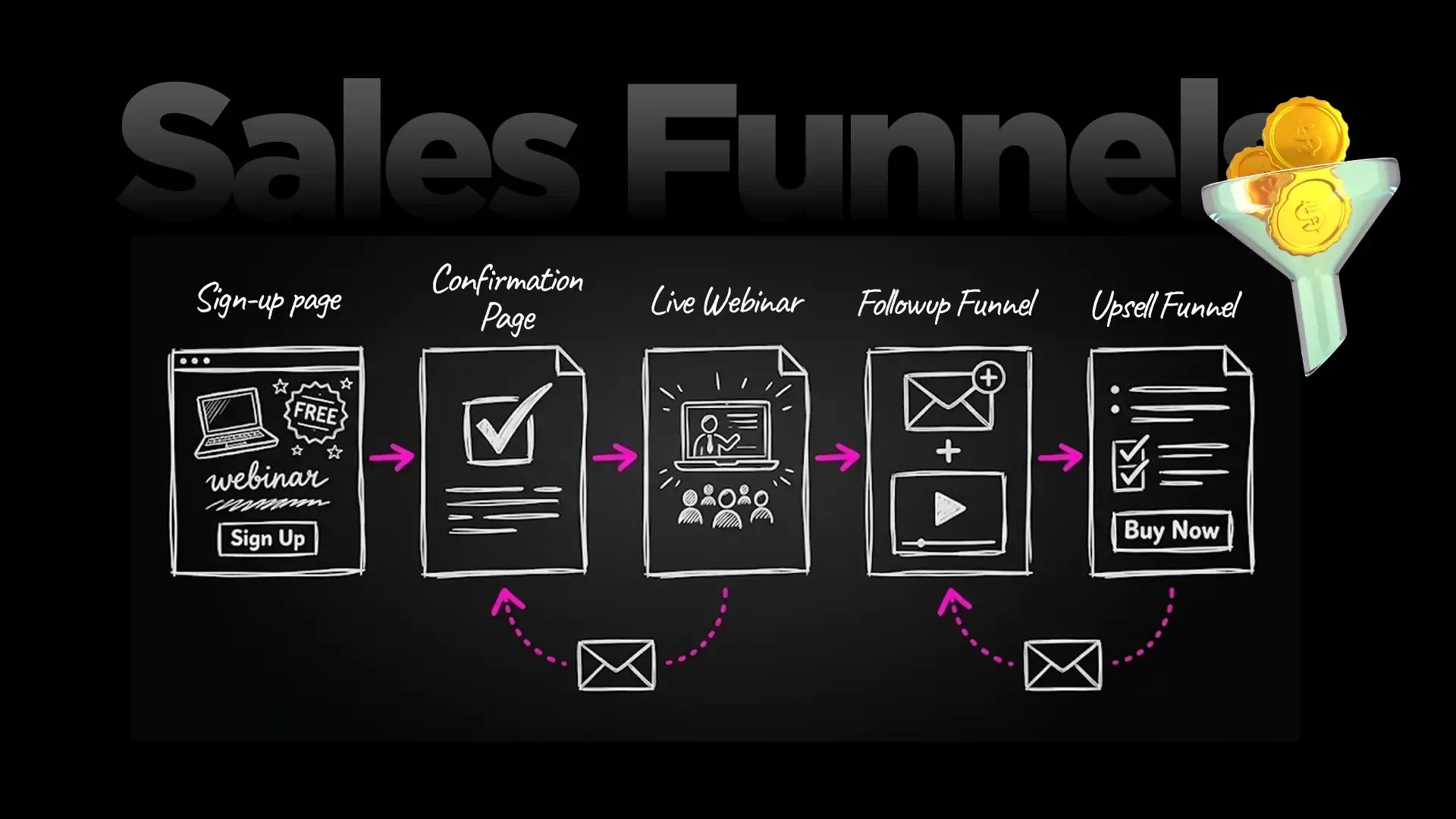
An example webinar funnel: sign-up page, confirmation page, live webinar, follow-up emails and an upsell funnel.
What does a good sales funnel builder include?
A good sales funnel builder includes a page editor, a checkout, post-purchase offers, a way to route buyers by their choices, and reports for every step. If any of those lives in a separate tool, you pay for extra subscriptions and lose data at every hand-off.
Use this checklist when you compare tools, including ours:
Pages: landing, sales and thank-you pages you can edit without code.
Checkout: a checkout you can customise and connect to the gateways your buyers use.
Order bumps: add-ons the buyer ticks on the checkout.
One-click upsells and downsells: offers after payment that do not ask for card details again.
Funnel logic: different next pages for "yes" and "no".
Split testing: a way to test one page against another.
Reports: page, product and journey numbers, not just a total.
Delivery: automatic access to a course or a download after payment.
FlexiFunnels covers all eight inside one account. Every feature is on every plan; only the usage limits (visits, pages, funnels) change between Professional and Premium.
How does the FlexiFunnels sales funnel builder work?
The FlexiFunnels sales funnel builder works in three layers: you create products, you build the pages, and you wire them together in a funnel screen that says what happens after each purchase or refusal. The funnel then runs by itself and reports every step.
Layer 1: products
A product is what you sell: a course, a coaching programme, a template pack. It holds the price, the delivery and the gateway settings. Your front-end offer, bump, upsell and downsell are each products.
Layer 2: pages
Pages live in projects. You build them in the drag-and-drop editor, start from the 1,000+ done-for-you templates listed on the pricing page, or generate a first draft with the AI Page Builder from a one-line prompt. Pages made with the AI Page Builder stay fully editable in the editor.
Layer 3: the funnel screen
The funnel screen is where logic lives. In the FlexiFunnels product screenshot below, you choose a front-end product and add it. Each row is then a rule: an action (Purchases or Say to no), the product it applies to, and the product or page to show next. A buyer who purchases the upsell goes to the next offer or the thank-you page. A buyer who says no is sent to a downsell.
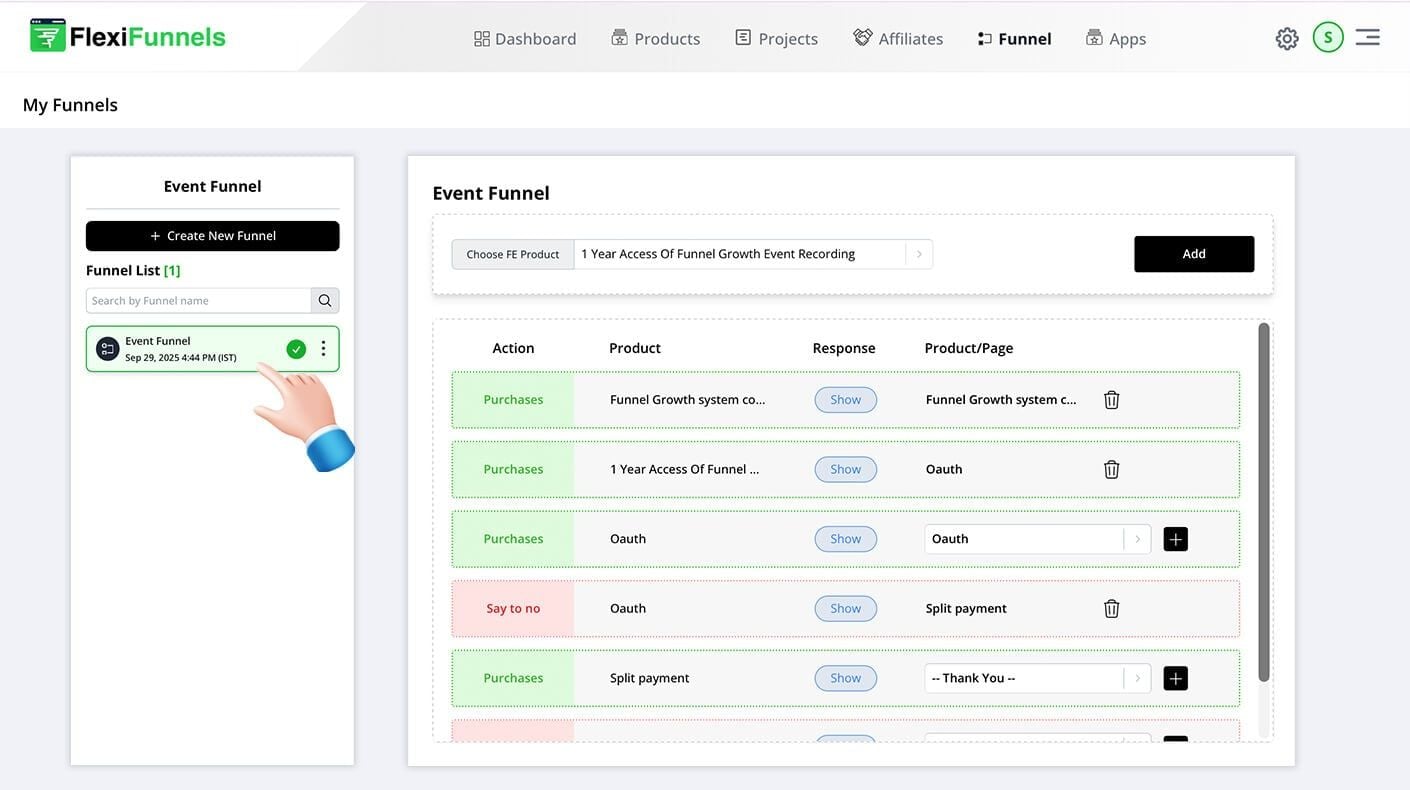
The Funnel tab in FlexiFunnels: each row sends a buyer to the next page depending on whether they purchased or said no.
According to the FlexiFunnels sales funnels page, you can add unlimited upsell and downsell paths in one funnel, add any number of one-time offers, and see conversion tracking at every step.
How do you build a sales funnel step by step?
You build a sales funnel in six steps: pick one offer, draw the path on paper, create the products, build the pages, wire the logic, then test before you send traffic. Do them in this order so you never design pages for a path you have not decided.
Pick one offer and one buyer. One funnel, one promise. "A 4-week nutrition course for new mothers" is a funnel. "All my courses" is a menu.
Draw the path. Write the pages in order: opt-in, sales page, checkout, upsell, downsell, thank-you. Mark what happens when the buyer says yes and when they say no.
Create the products. Add the front-end product, the order bump, the upsell and the downsell with their prices. Connect the payment gateways you will use.
Build the pages. Create a project and make each page in the editor or from a template. Keep each page to one action.
Wire the funnel. Open the Funnel tab, create a new funnel, choose the front-end product and add the rules for purchases and "say to no".
Test as a buyer. Buy your own funnel with a real low-value test, check the emails and course access, and fix anything that dead-ends.
If you would rather have a person look at your plan first, you can book a free 1:1 consultation with the FlexiFunnels team.
What is a one-click upsell and how is it different from an order bump?
An order bump is a small add-on the buyer ticks on the checkout page before paying. A one-click upsell is a separate offer shown after payment that the buyer accepts with one click, without typing card details again. Bumps raise the first order; upsells add a second one.
FlexiFunnels supports multiple order bumps on a checkout, and one-click upsells and downsells after purchase. Both are included on both plans.
Offer type | Where it appears | How the buyer accepts | Best used for |
|---|---|---|---|
Order bump | On the checkout page | Tick a box, then pay once | Small add-ons: a checklist, a template, an extra report |
One-click upsell | After the payment | One click, no card re-entry | A bigger, related offer: an advanced course, a done-with-you tier |
Downsell | After the buyer says no to the upsell | One click | A cheaper or lighter version of the upsell |
Price variations | On the same offer page | Choose a price option | Letting buyers pick a plan, such as one payment or a bundle |
One difference FlexiFunnels highlights: its upsell or downsell page can carry several products and price options. On its own homepage FAQ, FlexiFunnels says ClickFunnels allows one product per upsell or downsell (a FlexiFunnels statement, read on 22 November 2026; check ClickFunnels directly before you decide).
We will cover bumps and upsells in a dedicated guide. Here, the point is where they sit inside the funnel.
What does a sales funnel look like in numbers? (Worked example)
The easiest way to see why a funnel matters is to follow 1,000 visitors through one. The numbers below are example numbers for illustration only, not typical or expected results. Your conversion and take rates will differ.
Example A: a $47 course funnel
Visitors to the sales page: 1,000
Buyers at 4%: 40, paying $47 each = $1,880
Order bump ($17), taken by 25% of buyers: 10 × $17 = $170
One-click upsell ($97), taken by 20% of buyers: 8 × $97 = $776
Downsell ($37), shown to the 32 buyers who declined the upsell, taken by 25%: 8 × $37 = $296
Total revenue: $1,880 + $170 + $776 + $296 = $3,122. Average order value: $3,122 ÷ 40 = $78.05. Revenue per visitor: $3.12.
Example B: a $197 course funnel
Visitors: 1,000, buyers at 4%: 40 × $197 = $7,880
Order bump ($47), 25% take it: 10 × $47 = $470
Upsell ($497), 20% take it: 8 × $497 = $3,976
Downsell ($297), 25% of the 32 who declined: 8 × $297 = $2,376
Total: $7,880 + $470 + $3,976 + $2,376 = $14,702. Average order value: $14,702 ÷ 40 ≈ $367.55.
Example | Front end only | With bump, upsell and downsell | Change |
|---|---|---|---|
Example A ($47 course) | $1,880 | $3,122 | +66% |
Example B ($197 course) | $7,880 | $14,702 | +87% |
Why the different change? Example B has a larger upsell price relative to the front end (about 2.5 times, against about 2 times in Example A), so it adds more. The point is not the percentage. The point is that the same 1,000 visitors, bought by the same ad spend, produce more revenue when the path after the first sale is designed. This is exactly the lens behind funnel metrics like conversion rate, AOV and EPC.
These are example numbers, not promises. FlexiFunnels does not guarantee any income or sales result.
How do you track every step of a funnel?
You track a funnel by looking at the numbers for each page and each product, not just the total. FlexiFunnels reports page views, conversions and bounce rates per page, revenue by product and price variation, and the customer journey with drop-off points.
Two report views matter most. Project reports show each page's views, opt-ins, sales and earnings per page view. Product reports show checkout views, sales, revenue, average order value, earnings per checkout visitor and conversion rates.
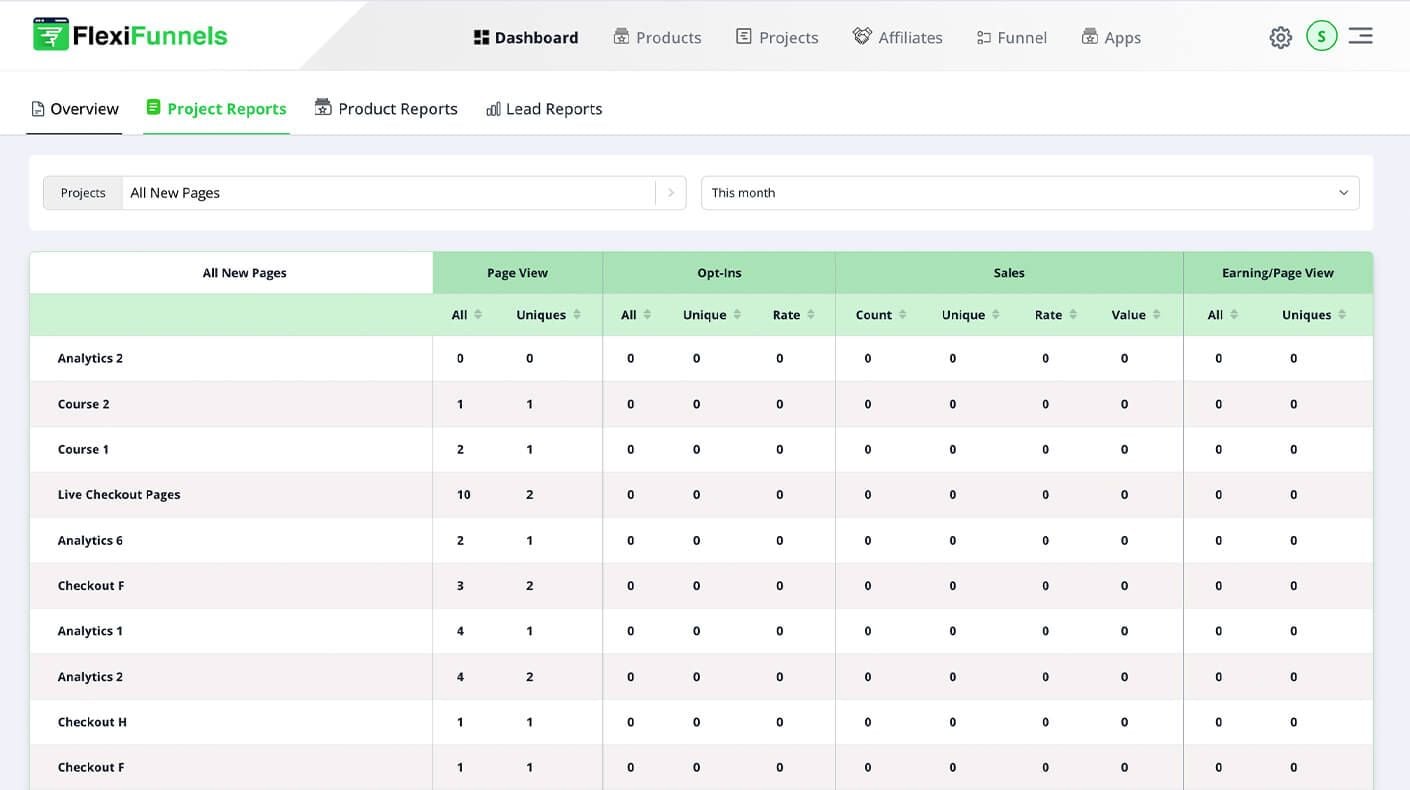
Project reports: page views, opt-ins, sales and earnings per page view for each page in your funnels.
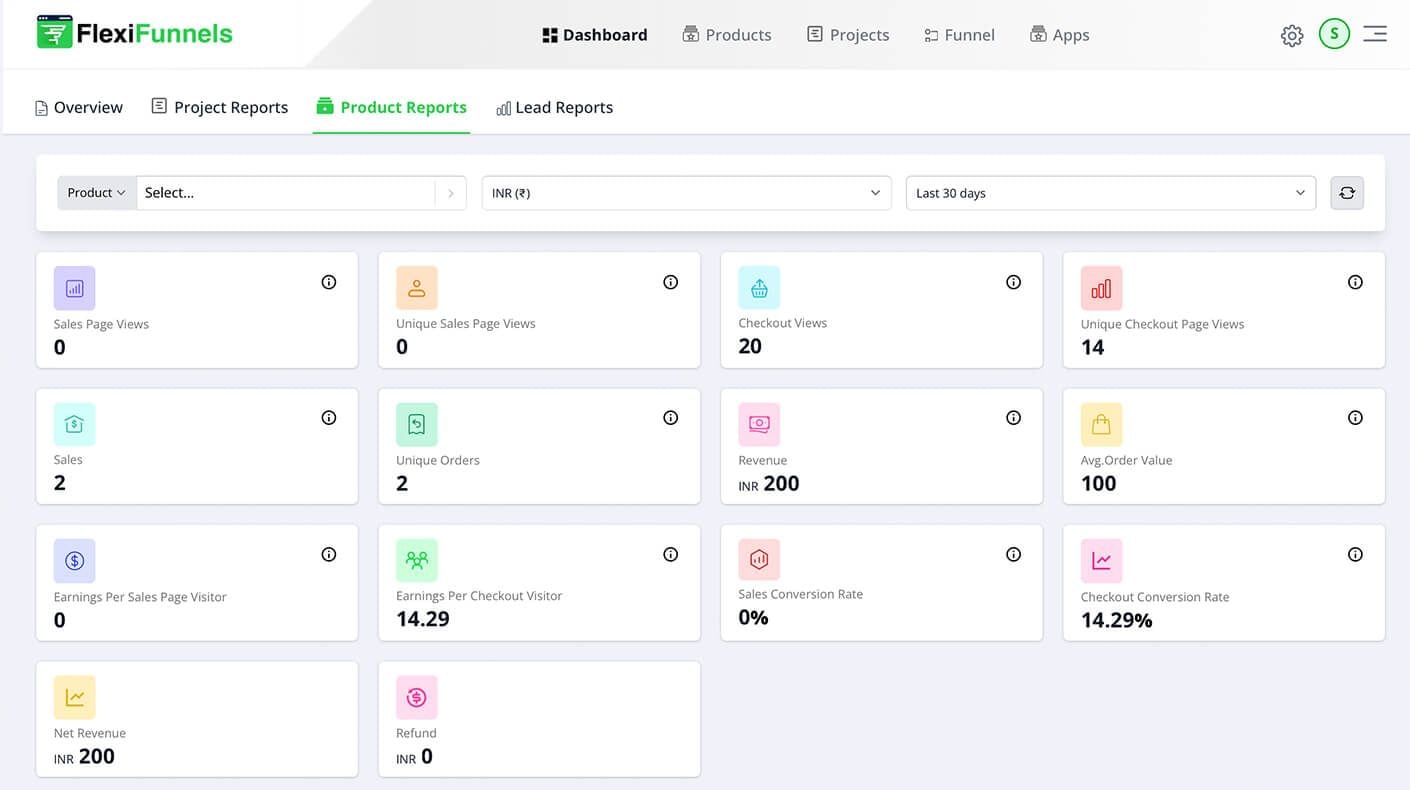
Product reports: checkout views, sales, revenue, average order value and checkout conversion rate. (Sample account data.)
How to read them:
Low opt-in rate: the offer or the headline on the first page is weak.
Good sales-page views, low checkout views: the button, price or promise is losing people before the checkout.
Good checkout views, low sales: look at the checkout, payment options and trust elements.
Low upsell take rate: the offer is not related enough to what they just bought, or the price jump is too big.
If you run paid ads, pair these reports with FlexiFunnels Source Tracking, which traces each lead and sale back to the ad that brought the buyer.
Can you split test a sales funnel?
Yes. FlexiFunnels split testing serves up to 10 variations on one URL, with equal or custom traffic splits and manual or automatic winner selection. Test one change at a time: the headline, the offer, the price or the button.
Start with the page that loses the most people in your reports. A change that lifts the first step by a few points helps every later step, because more people reach them. Do not test five things at once on a small audience; you will not know which one worked.
Which conversion tools work inside a funnel?
FlexiFunnels bundles conversion tools you can switch on inside funnel pages, so you do not add a plugin for each one. The sales funnels page lists source tracking, social proof notifications, the Facebook Conversions API, exit-intent pop-ups, countdown timers and order bumps.
Countdown timers: day, date and evergreen. Use real deadlines only. A timer that resets for every visitor and a fake "ends tonight" hurts trust.
Social proof notifications: show recent sign-ups or purchases on the page. They must reflect real activity.
Exit-intent pop-ups: show a targeted offer when the visitor is about to leave.
Facebook Conversions API: sends events from the server to Meta, so tracking does not depend only on the browser. It is included on both plans.
Where do cart abandonment and checkout fit in the funnel?
The checkout is the most expensive step to lose people at, because the buyer has already said yes. Baymard Institute's review of 50 studies puts the average documented cart abandonment rate at 70.22%, and its top reasons include extra costs (40%), distrust of the site with card details (19%), a forced account (18%) and a long or complicated checkout (17%).
That is an ecommerce figure from Baymard Institute's cart abandonment statistics, so treat it as a benchmark for the problem rather than a forecast for your funnel. The fix is inside the funnel: a short checkout, clear total price, trust elements and the payment methods your buyers expect.
FlexiFunnels can also send an automatic sequence of up to 15 emails to people who started checkout but did not pay. We cover this in the checkout guide: how to design a checkout page that converts.
Who is the FlexiFunnels sales funnel builder for?
It suits people who sell one offer at a time and want pages, checkout, upsells and course delivery in one place: coaches, consultants, course creators, digital product sellers, and freelancers and agencies building funnels for clients.
If you are... | What the funnel does for you |
|---|---|
A coach or consultant | Opt-in or webinar page, application or checkout, and a follow-up offer |
A course creator | Sales page, checkout, bump and an upsell into a bigger programme, with course access after payment |
A digital product seller | Low-ticket front end plus bump and upsell to raise each order |
An agency or freelancer | Funnels built for clients, with sub-users and a commercial licence (9 sub-users on both plans) |
A beginner with one offer | One simple path to start; templates and the AI Page Builder for the first draft |
What are the limits of a sales funnel builder?
Honest limits: FlexiFunnels is built for single-product funnels, and it says multi-product stores are not supported yet. Subscription payments are marked Beta. A funnel also cannot fix a weak offer or the wrong audience.
Not a multi-product store: if you need a catalogue with a cart, add-to-cart and price-changing variants, a store platform fits better.
Subscriptions are in beta: check them against your needs before you build a business on recurring billing.
Usage limits apply: Professional includes 100,000 monthly visits, 100 pages and 50 sales funnels. Premium includes 300,000 visits, 300 pages and 200 funnels.
1% transaction fee: FlexiFunnels charges 1% on sales made through its pages, on both plans, on top of your payment gateway's own charges.
A builder does not bring traffic: you still need ads, content, email or partners to send visitors.
How much does a sales funnel builder cost?
FlexiFunnels Professional costs $447 per year and Premium costs $697 per year. Every feature is on every plan. FlexiFunnels advertises a 30-day money-back guarantee and offers a 14-day free trial with no credit card required (every feature unlocked, 3 AI Page Builder credits).
Plan | Price | Funnels | Pages | Monthly visits |
|---|---|---|---|---|
Professional | $447/year | 50 | 100 | 100,000 |
Premium | $697/year | 200 | 300 | 300,000 |
Prices checked on the FlexiFunnels pricing pages on 22 November 2026. Extra visits can be added if you reach your limit; pages stay live meanwhile. See the current plans here.
How do existing FlexiFunnels customers switch it on?
If you already have a FlexiFunnels account, the funnel builder is in your main menu. The top navigation has Dashboard, Products, Projects, Affiliates, Funnel and Apps. Funnels live under the Funnel tab.
Create or check your products under Products: front end, bump, upsell and downsell.
Build your pages under Projects.
Open Funnel and choose Create New Funnel. Pick the front-end product and add it.
Add the rules: what a buyer sees after a purchase and after "say to no".
Buy your own funnel as a test and check the reports under Dashboard.
If a step looks different in your account, the FlexiFunnels knowledge base has current tutorials, or the team can walk you through it on 24/7 live chat.
How does this compare with other ways to build a funnel?
Approach | What you get | Trade-off |
|---|---|---|
Website plus separate plugins | Full control of the design | Many tools to connect, and gaps in the data |
Payment gateway checkout only | Quick to start | No bumps, no upsell path, little data |
All-in-one funnel builder (FlexiFunnels) | Pages, checkout, upsells, reports and course delivery in one account | Built for single-product funnels, not a multi-product store |
For head-to-head tools, see our FlexiFunnels vs ClickFunnels comparison, and for the bigger picture of what the platform includes, read What Is FlexiFunnels?.
Do it by chatting: the FlexiFunnels MCP
Everything in this guide can also be done just by chatting. The FlexiFunnels MCP connects ChatGPT, Claude or Gemini to your FlexiFunnels account. You ask in plain words, review what it is about to do, approve, and it's done.
"Build me a funnel for my $297 course: sales page, checkout, a $97 one-click upsell, a $47 downsell and a thank-you page."
"Add a $27 order bump to my checkout."
"Show me last week's sales and average order value for my webinar funnel."
Prefer to stay in your dashboard? Flexi Genie is the same chat, built right into FlexiFunnels. See how the FlexiFunnels MCP works, or read the full FlexiFunnels MCP guide.
Frequently asked questions
What is a sales funnel builder?
A sales funnel builder is software for creating the connected pages a buyer moves through: landing or sales page, checkout, upsell, downsell and thank-you. It also tracks each step. Instead of loose web pages, you get one designed path with logic for what each buyer sees next.
What is the best sales funnel builder for beginners?
The best one for a beginner is the one that covers pages, checkout and upsells without extra tools. FlexiFunnels offers templates, a drag-and-drop editor, the AI Page Builder and a free 1:1 consultation call. Start with one offer and one simple path before adding more steps.
How many steps should a sales funnel have?
As few as the offer needs. A simple funnel can be a sales page, a checkout and a thank-you page. Add a bump, an upsell and a downsell once the basic path converts. More steps only help if each one asks for one clear decision.
Does FlexiFunnels support one-click upsells and downsells?
Yes. FlexiFunnels supports one-click upsells and downsells after purchase, so buyers accept an extra offer without re-entering payment details. You can add unlimited upsell and downsell paths in a funnel and route buyers differently if they say yes or no.
How many funnels can I build on FlexiFunnels?
Professional includes 50 sales funnels and Premium includes 200. Both plans include the same features. Professional has 100 pages and 100,000 monthly visits; Premium has 300 pages and 300,000 visits. If you reach the visit limit, pages stay live and extra visits can be added.
Can I split test my funnel pages?
Yes. FlexiFunnels split testing serves up to 10 variations on one URL, with equal or custom traffic splits and manual or automatic winner selection. Test one change at a time, starting with the page where your reports show the biggest drop.
Do I need a separate checkout tool?
No. FlexiFunnels includes customisable checkout pages with several payment gateways: Stripe, PayPal and Paddle, plus regional gateways such as Razorpay, Cashfree and Instamojo (India), Xendit (Southeast Asia) and Paystack (Africa). Order bumps and coupons are built in. That keeps checkout data in the same reports as your funnel pages.
Can I sell a course through a sales funnel?
Yes. FlexiFunnels includes built-in course hosting. To sell a course you need pages, a course membership and a product, then link them. The buyer gets their login details by email right after payment, and the funnel can add a bump or upsell around the course.
Can I use FlexiFunnels as a store with a shopping cart?
Not today. FlexiFunnels supports single-product funnels and says multi-product stores are not supported yet, including add-to-cart and price-changing variants. If you sell one offer at a time, it fits. If you need a full catalogue, use a store platform.
How much does a sales funnel builder cost?
FlexiFunnels Professional is $447 per year and Premium is $697 per year, with the same features on both. A 1% transaction fee applies on both plans. There is a 14-day free trial with no credit card required, and a 30-day money-back guarantee is advertised.
Will a sales funnel guarantee more sales?
No. A funnel gives your traffic a designed path and shows where people drop off, but results depend on your offer, price, audience and traffic. The numbers in this guide are examples. FlexiFunnels does not promise income or sales results.
Does FlexiFunnels work for sellers in India?
Yes. INR pricing including GST is available, and buyers can pay through regional gateways such as Razorpay, Cashfree and Instamojo, including UPI.
Next step: build your first funnel
Start with one offer, draw the path, and build it in one account so you can see every step. Try FlexiFunnels here (start your 14-day free trial, no credit card needed), see FlexiFunnels here or book a free 1:1 consultation if you want a plan for your offer before you buy.