Conversion rate optimization tools are the on-page features that turn more of the visitors you already have into leads and buyers: countdown timers, exit-intent popups, tab messages, notification bars, social proof and split tests. Instead of buying more traffic, you improve what happens after the click. Wikipedia describes conversion rate optimization as the systematic process of increasing the percentage of visitors who complete a desired action.
FlexiFunnels builds 20+ of these tools straight into the page editor, and the quickest way to use them is just by chatting: tell Flexi Genie (built into the dashboard) or ChatGPT, Claude or Gemini (through the FlexiFunnels MCP) what you want, approve it, and it is built. For example: "On my masterclass page, add an exit-intent popup that offers 20% off and a daily timer that resets at midnight." FlexiFunnels builds and runs by chat (Flexi Genie + MCP), and you can still do everything by hand in the drag-and-drop editor, as this guide shows. FlexiFunnels is trusted by 23,000+ businesses.
See FlexiFunnels here · Start your 14-day free trial (no credit card required, every feature unlocked).
What are conversion rate optimization tools?
Conversion rate optimization (CRO) tools are software features that help a page, form or checkout turn a higher share of visitors into leads or customers. They fall into four jobs: create a reason to act now, catch visitors who are about to leave, build trust, and prove what works with tests.
Many CRO stacks are a patchwork: one app for popups, another for timers, another for notifications, another for A/B tests. Each adds a monthly bill, a script that slows the page and one more login. FlexiFunnels bundles 40+ tools in one platform, including 20+ built-in conversion tools, so the same editor you build the page in also holds the tools that sell from it.
The homepage headline says it plainly: AI builds your funnels, conversion tools do the selling. This guide covers the on-page tools. For the numbers that tell you whether they work, read our guide to funnel metrics: conversion rate, cost per lead, AOV and EPC.
Why optimize conversions before buying more traffic?
Because every visitor you pay for is wasted if the page does not convert them. A page that converts a few more visitors lowers your cost per lead and cost per sale on the same ad spend, without changing the campaign.
Worked example (hypothetical numbers, not a promise of results): you spend $2,000 on ads and send 2,000 visitors to a masterclass page that sells a $197 program. If 40 visitors buy, that is a 2% sale rate, $50 cost per sale and $7,880 in revenue. If tools like the ones below lift that to 50 buyers, the same $2,000 now costs $40 per sale and brings in $9,850. The traffic did not change. Only the page did.
Scenario (example) | Visitors | Buyers | Sale rate | Cost per sale | Revenue at $197 |
|---|---|---|---|---|---|
Before | 2,000 | 40 | 2.0% | $50.00 | $7,880 |
After | 2,000 | 50 | 2.5% | $40.00 | $9,850 |
This is a worked example to show the arithmetic. Your numbers will differ, and results are not typical or guaranteed.
Which conversion rate optimization tools are worth using?
Start with the tool that fixes your biggest leak. The table below shows what each FlexiFunnels tool does and the job it is best at, so you can pick one to switch on today.
Tool | What it does | Best for |
|---|---|---|
Countdown timers (date, daily, evergreen) | Shows a real deadline on the page | Launches, sales, limited bonuses |
HelloBar with timer | Pins a message and timer to the top of the page | Announcing one offer on every screen |
Exit-intent popup | Offers a discount, guide or form as a visitor moves to leave | Capturing leads that would bounce |
Tab messaging | Changes the browser tab title, with an optional sound | Pulling back visitors who switched tabs |
Dynamic date display | Shows today's date or a date a set number of days ahead | Deadlines that stay fresh for each visitor |
FlexiProof | Real sign-ups and sales as pop-up notifications | Trust on cold traffic |
Viewer counter | Shows how many people are viewing an offer | Genuine interest at a glance |
Split testing | Up to 10 versions on one URL, manual or automatic winner | Proving which page wins |
Cookie consent | GDPR-ready banner with preferences | Trust and privacy on EU and UK traffic |
Best for: coaches, course creators, agencies and digital product sellers who run paid traffic to landing pages, webinars and checkouts, and who want the tools, the pages and the AI builder in one place (builds and runs by chat with Flexi Genie + MCP).
How do countdown timers increase conversions?
A countdown timer gives the visitor a reason to decide now instead of "later", which usually means never. It only works when the deadline is real, so choose the type that matches your offer.
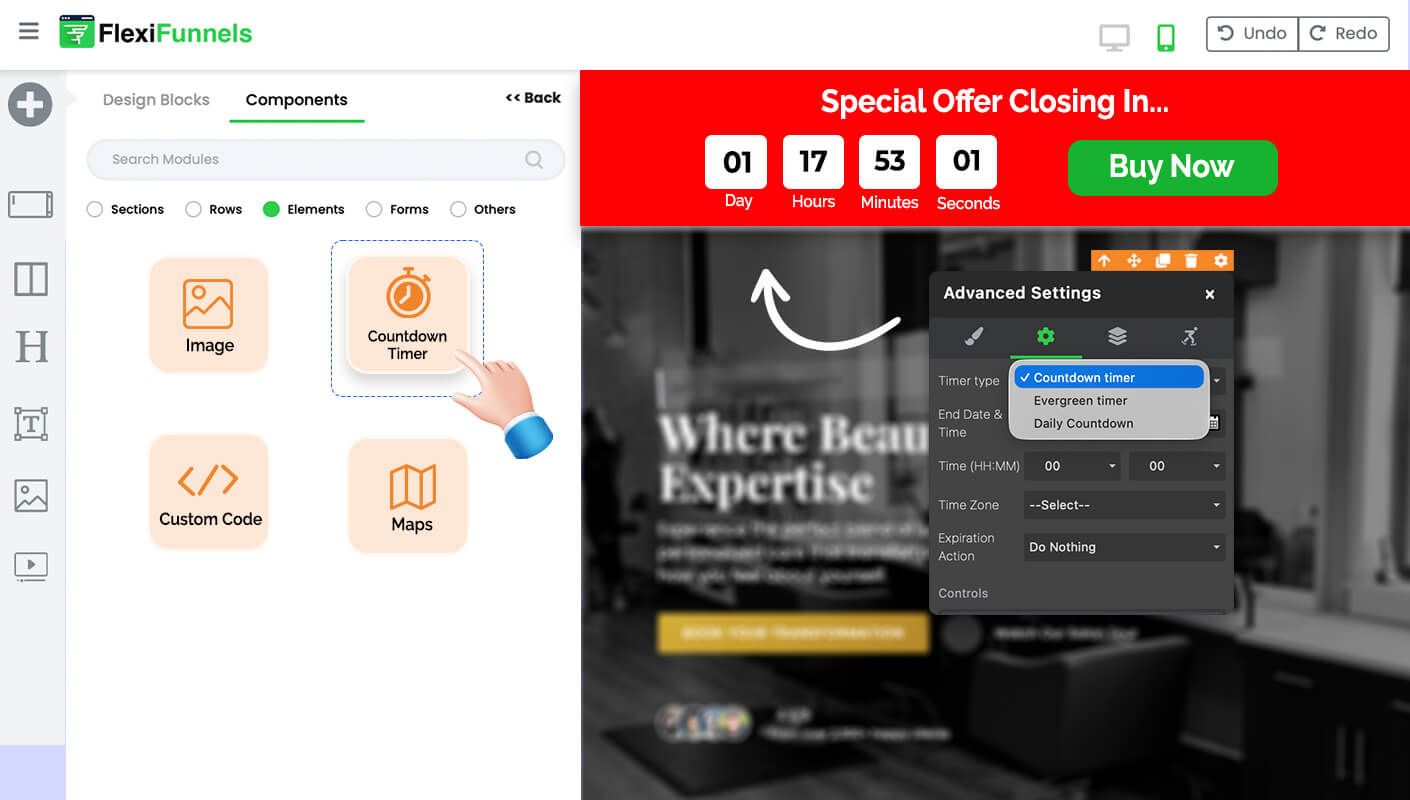
The countdown timer element in the FlexiFunnels editor, with its three timer types.
FlexiFunnels offers three kinds, all added in the page editor and placed anywhere on a page:
Date timer: ends at the date and time you set. Use it for launches and sales ("offer ends Sunday midnight").
Daily timer: resets every day at the time you choose. Use it for a recurring daily bonus.
Evergreen timer: starts for each visitor when they first arrive, for example 15 minutes from arrival. Use it for a welcome offer that really does expire for that visitor.
In the editor, the timer settings include the timer type, end date and time, time zone and an expiration action.
How do you keep urgency honest?
Tie every timer to something real: a bonus that really is removed, a price that really changes, a cohort that really closes. Fake urgency costs you trust and refunds. If you run an evergreen offer, make sure the personal deadline is enforced, for instance by a coupon that expires.
What is a HelloBar and when should you use it?
A HelloBar is a slim bar pinned to the top of the page that keeps one message and one button in view as people scroll. FlexiFunnels offers a HelloBar with a timer that you can pin to the top of any page.
Use it for one clear message: "Free masterclass starts tonight", "Offer closes in 02:14:09" or "Free shipping on orders today". Keep it to a single line and one action so it supports the page instead of competing with it.
What is an exit-intent popup and does it work?
An exit-intent popup is a message that appears when a visitor moves to close the tab, offering a discount, a free guide or a short form. It gives you one last chance to keep a lead that was about to be lost.
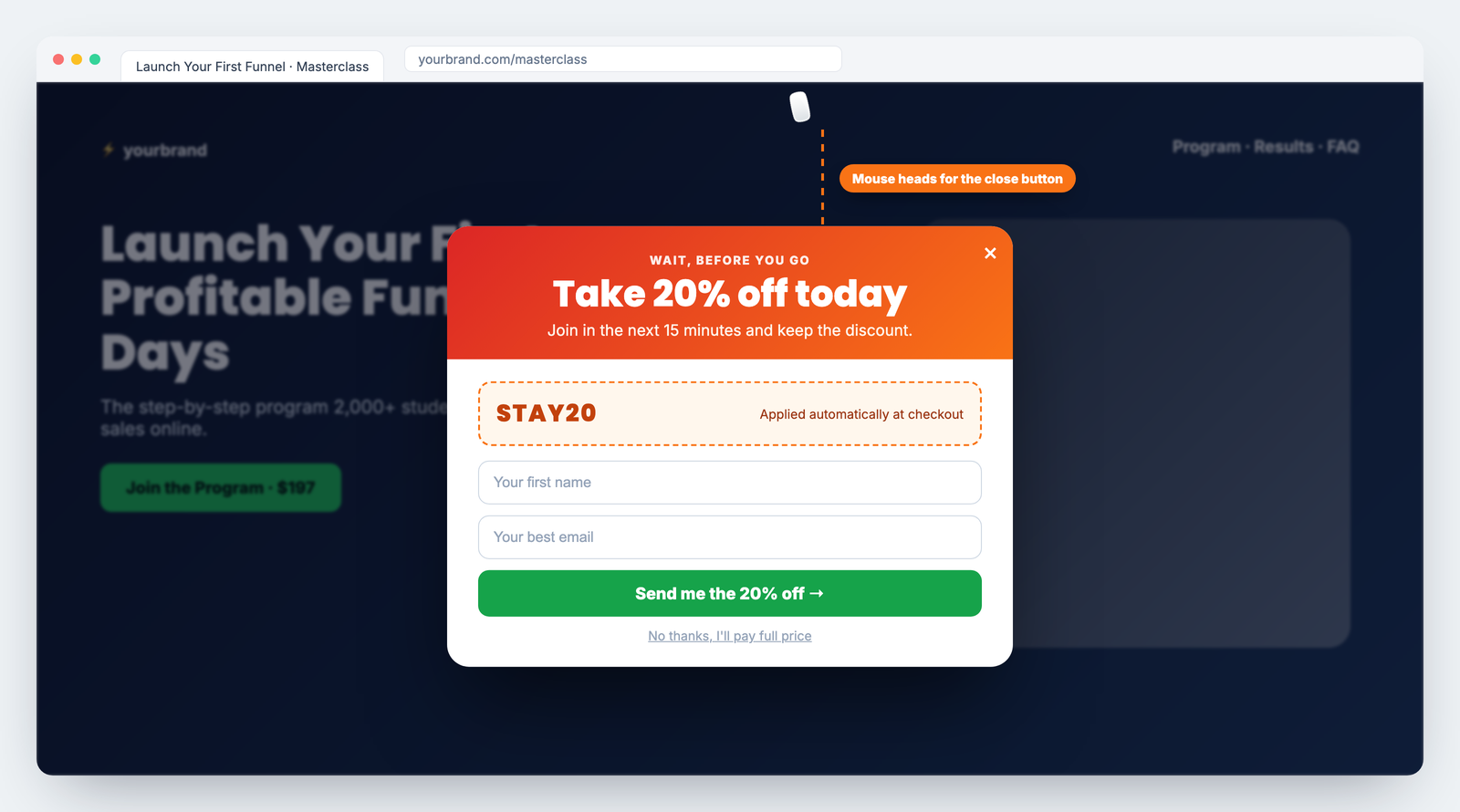
An exit-intent popup that offers 20% off in return for an email address.
FlexiFunnels exit-intent popups show on exit intent, not while the visitor is still reading, and they are built in the editor like any other section. The content can be a discount, a free guide or a short form. On a computer the trigger is the mouse moving up past the top of the page.
What should an exit-intent popup say?
Name the moment. "Wait, before you go" tells the visitor why a popup appeared.
Offer one thing. A 20% coupon, a checklist or a short video, never a menu of options.
Ask for the least. First name and email is usually enough.
Give a polite way out. A "No thanks" link keeps the visitor on your side.
Pair the popup with a coupon so the discount is applied automatically at checkout. FlexiFunnels coupons can be global or product-specific, a percentage or a fixed amount, with expiry dates and usage limits.
How does tab messaging bring visitors back?
Tab messaging changes your page's browser tab title to a message that pulls the visitor back, with an optional ping sound. It targets people who opened your page, then switched to another tab and forgot you.
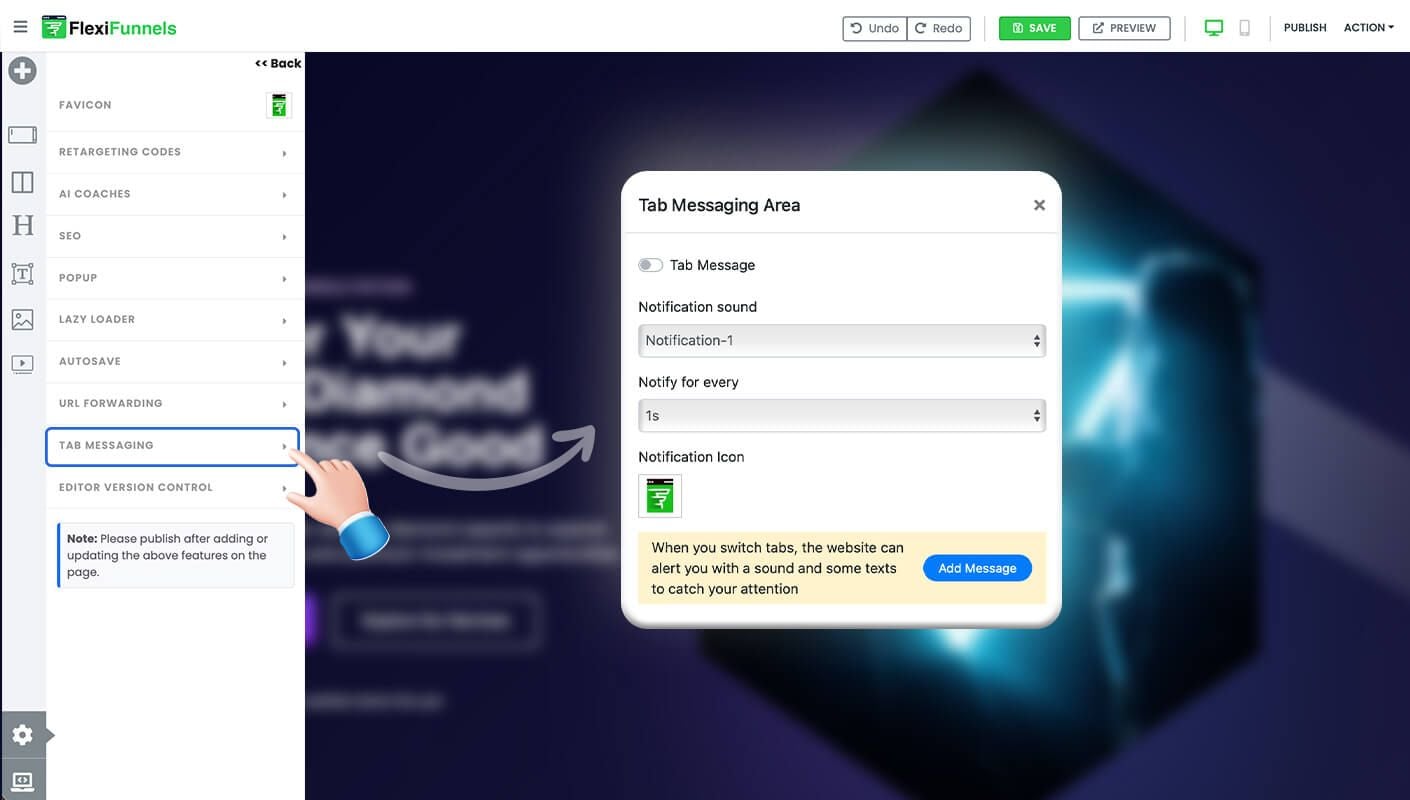
The Tab Messaging area in the editor settings: switch it on, pick a sound and an icon, and add your messages.
You set it per page in the editor with no code. Your own messages rotate in the tab title, and the optional sound can play as many times as you choose. After adding or changing it, publish the page so the change goes live.
Keep messages short and useful: "Your seat is saved", "Don't lose your spot" or "Your 20% is waiting". Use sound sparingly, because a noisy page annoys the people you are trying to win back.
How do dynamic dates keep deadlines fresh?
A dynamic date shows today's date, tomorrow's date, or a date a set number of days ahead, and updates for each visitor. That means a line like "Enrol by Friday" or "Your bonus ends {date}" never goes stale.
You choose the format, either the date alone or the day and date, and you can combine it with timers. It is a small tool with a big effect on pages that run all year, because an old date on a "limited" offer is one of the fastest ways to look untrustworthy.
How does social proof lift conversions?
Social proof shows that other people already trust you, which lowers the risk a new visitor feels. FlexiProof shows real sign-ups and sales as small pop-up notifications on your pages.
FlexiProof has 20+ notification styles, lets you filter by product and by time (for example the last 24 or 48 hours), and has a minimum count so it appears only once your numbers look strong. A viewer counter can also show how many people are looking at an offer right now. Only use counters that reflect real activity.
For the full guide, see social proof marketing: how to use sales and sign-up notifications to build trust.
How do split tests prove which change actually works?
A split test shows different versions of a page to different visitors and measures which converts best. Without one, you are guessing whether a new timer or headline helped or hurt.
FlexiFunnels split testing serves up to 10 versions on one URL, with equal or custom traffic splits, campaign rules that end a test, and manual or automatic winner selection. Change one thing at a time: the headline, the offer, the button or the popup. Read the full walkthrough in split testing: how to A/B test your landing pages and find the winner.
Do you need a cookie consent banner?
If you collect data from visitors in the EU or UK, you will usually need one, and a clear banner also builds trust. FlexiFunnels includes a GDPR-ready cookie consent banner with preferences, so visitors can accept all, reject all or choose categories.
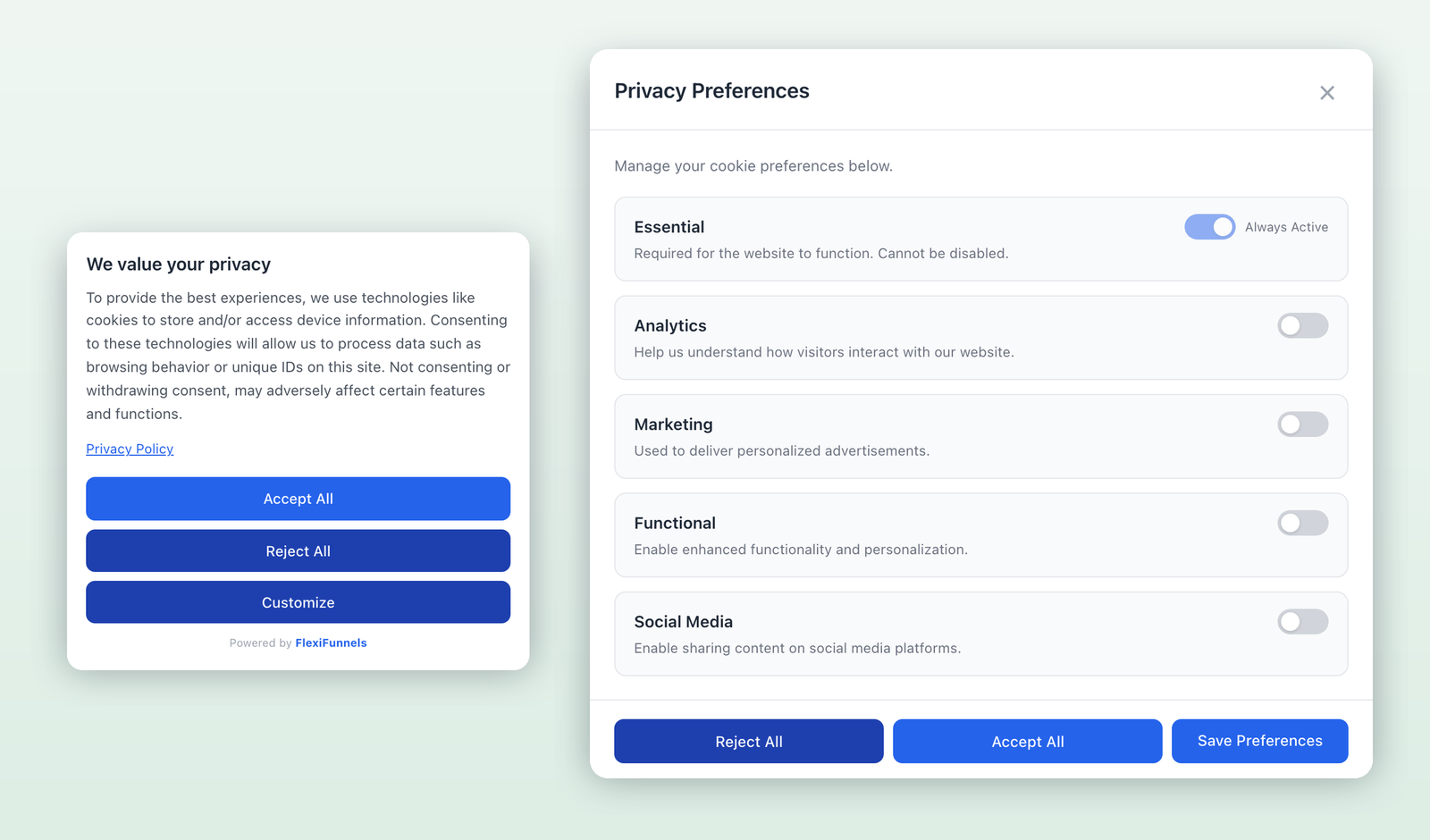
A cookie consent banner and its privacy preferences panel.
This is a product feature, not legal advice. Check your own obligations with a qualified adviser.
Which tools work at checkout, not only on landing pages?
Several conversion tools live in the checkout itself. They matter because that is where buyers decide.
Order bumps: multiple bumps per checkout. See how to add an order bump.
One-click upsells and downsells: unlimited, with a "say no" path to a lighter offer.
Coupons: global or product-specific, percentage or fixed, with limits and end dates.
Cart abandonment emails: up to 15 emails per product, each with its own delay, that stop when the buyer purchases.
Checkout design: several gateways side by side, multi-currency and 100+ checkout templates. See how to design a checkout page that converts.
Baymard's analysis of 50 studies puts the average documented cart abandonment rate at 70.22%, so recovery tools at the checkout are rarely wasted effort.
How do you set up conversion tools in FlexiFunnels?
Most conversion tools are added inside the page editor, so you set them up while you build the page. The exact menu names can change, so use the steps below as a guide and the in-app tutorials for the latest clicks.
Open your page in the editor. Use the drag-and-drop editor, or generate a page first with the AI Page Builder.
Add a timer or HelloBar. Open the Components panel, choose the Countdown Timer element and drag it onto the page, then pick the timer type, end time, time zone and expiration action.
Add an exit-intent popup. Build it in the editor like any other section and set it to show on exit intent.
Switch on tab messaging. Open the page settings, choose Tab Messaging, toggle it on, pick a sound and icon, and add your messages.
Add social proof. Turn on FlexiProof and choose its style, product and time filters.
Publish the page, then open it in a private window to check each tool as a visitor would.
Measure. Watch opt-in rate, checkout rate, average order value and earnings per visitor in analytics, and test one change at a time.
New to FlexiFunnels? Start your 14-day free trial: no credit card required, every feature unlocked like a paid account, with 3 AI Page Builder credits included. Our team is available 24/7, and you can book a free 1:1 consultation.
Do it by chatting: the FlexiFunnels MCP
Everything in this guide can also be done through the FlexiFunnels MCP. Connect ChatGPT, Claude or Gemini to your FlexiFunnels account, ask in plain words, approve the change, and it is done. Flexi Genie is the same chat built into the dashboard (how it works).
Example prompts:
"On my masterclass landing page, add an evergreen timer that gives each visitor 15 minutes and a HelloBar that says the free bonus ends today."
"Add an exit-intent popup to my $197 course page that offers 20% off in exchange for a first name and email."
"Turn on tab messaging for my webinar registration page with two messages: 'Your seat is saved' and 'Don't lose your spot'."
Learn more in the FlexiFunnels MCP guide or at sb.flexifunnels.com/mcp. Check what each action did before approving it, and always preview the page.
What are the limits of conversion tools?
Tools amplify a good offer; they cannot rescue a weak one. A timer on a page nobody wants just makes the page louder.
The public feature page does not list numeric limits for timers, HelloBar, tab messaging, exit-intent popups or cookie consent, so check the in-app tutorials for details on your plan.
Too many tools on one page can slow it down and distract from the single action you want. Add one at a time and test.
Tab messaging and exit intent work best on desktop, since exit intent is triggered by the mouse moving up past the top of the page.
Results are not guaranteed and vary by offer, traffic and audience.
Frequently asked questions
What are conversion rate optimization tools?
They are features that help turn more website visitors into leads or buyers. Common examples are countdown timers, exit-intent popups, notification bars, social proof, split testing and checkout tools such as order bumps, coupons and cart recovery emails. FlexiFunnels includes 20+ of them in the page editor.
What is the best conversion rate optimization tool for a beginner?
Start with the one that fixes your biggest leak. If visitors leave without signing up, add an exit-intent popup. If they hesitate to decide, add an honest timer. If you are unsure which version wins, run a split test. Add one tool at a time so you know what worked.
What is an exit-intent popup?
An exit-intent popup is a message that appears when a visitor moves to close the tab, such as a discount, a free guide or a short form. In FlexiFunnels it shows on exit intent rather than while someone is reading, and you build it in the editor like any other section.
Are countdown timers allowed on landing pages?
Timers are a normal tool, but the deadline should be real. Tie each timer to a genuine change: a bonus removed, a price rise or a closing cohort. Fake urgency harms trust and increases refunds, so use evergreen timers only when the personal deadline is actually enforced.
What is the difference between a date, daily and evergreen timer?
A date timer ends at a fixed date and time. A daily timer resets every day at a time you choose. An evergreen timer starts for each visitor when they first arrive, for example 15 minutes from arrival. All three are added in the FlexiFunnels page editor.
Does tab messaging really work?
It is a low-effort nudge for visitors who switched tabs and forgot you. It changes the tab title to your message, with an optional sound. We do not claim a specific lift, so measure it on your own page with a split test.
How do I know if a conversion tool is working?
Compare the same metric before and after, or better, run a split test. Track opt-in rate, checkout conversion rate, average order value and earnings per visitor. Change one thing at a time and give each test enough visitors before choosing a winner.
Can I use these tools without coding?
Yes. The tools are added in the visual editor, and tab messaging is set per page with no code. You can also ask Flexi Genie, ChatGPT, Claude or Gemini through the FlexiFunnels MCP to set them up for you in plain language, then approve the result.
Do conversion tools slow my page down?
Every extra element adds some weight, so add only what you need. FlexiFunnels says published pages are served through Cloudflare's CDN with lazy loading, and it reports load-testing at 100,000+ visitors in one minute. Always check your own page speed after adding tools.
Do the tools work for traffic outside the US?
Yes. FlexiFunnels is a global platform, with multi-currency checkout and several payment gateways side by side. For readers in India, pricing is also available in INR including GST, and regional gateways and UPI are supported.
Is there a free trial?
Yes. FlexiFunnels offers a 14-day free trial with no credit card required, every feature unlocked like a paid account, and 3 AI Page Builder credits included. Start it from the pricing page.
Next step: turn more of your traffic into customers
Pick one tool, switch it on today and measure it. Try FlexiFunnels here with a 14-day free trial, see FlexiFunnels here, or read the related guides on how to increase online sales and the FlexiFunnels conversion tools page.