Social proof marketing is the practice of showing visitors real evidence that other people have already chosen, bought from or trusted you, so that a new visitor feels safer taking the same step. Reviews, testimonials, customer counts, case studies and live notifications of recent sign-ups and sales are all forms of it. The psychology is old and simple: when we are unsure, we look at what others do.
The fastest way to add the live kind: with FlexiFunnels you can set up social proof notifications, and build and run your whole business, just by chatting. Tell Flexi Genie (built into your dashboard, see how it works) or ChatGPT, Claude or Gemini (through the FlexiFunnels MCP) what you want, approve it, and it is built. For example: "Show a notification of recent sign-ups on my webinar page, only once there are at least 10 in the last 48 hours."
See FlexiFunnels here | Start your 14-day free trial (no credit card required, every feature unlocked) | FlexiProof and the other conversion tools
This guide covers what social proof marketing is, the types that work, how live notifications fit in, a worked example, how to place them, how to test them, and the one rule that matters most: only show what is real.

A FlexiProof notification showing a recent workshop sign-up on a page.
What is social proof marketing?
Social proof marketing means using other people's visible actions and opinions to reduce a new visitor's doubt. It works because buying from someone you do not know feels risky, and seeing that others have done it lowers the risk. The idea is covered in the Wikipedia article on social proof, and the Nielsen Norman Group discusses how it shows up in website design.
A visitor who lands on your page is asking silent questions. Is this real? Do people like me buy this? Did it work for them? Social proof answers those questions before the visitor has to ask them.
What is social proof in sales?
In sales, social proof is any evidence a prospect sees that other buyers have said yes: a testimonial, a client logo, a review score, a number of customers, or a message that someone just signed up. It shortens the decision because the buyer borrows confidence from people who went first.
What are the main types of social proof?
The main types are customer reviews, testimonials, case studies, expert or media endorsements, user numbers and live activity. Each does a slightly different job, and the strongest pages combine two or three.
Type | What it looks like | Best for | Where it sits |
|---|---|---|---|
Reviews and ratings | Star scores and review excerpts | Building general trust | Near the offer and the button |
Testimonials | A named customer quote or video | Overcoming a specific doubt | Under the headline and next to the price |
Case studies | A short story with before and after | Higher-priced offers | Mid-page on a long sales page |
Numbers | "23,000+ businesses" style counts | Showing scale | Hero area and footer |
Expert or media proof | Logos, quotes, awards | Borrowed credibility | Near the top |
Live activity notifications | "Someone just signed up" pop-ups | Showing momentum right now | Corner of the page while the visitor decides |
Live activity is the only type that tells the visitor what is happening now, which makes it a good partner for the others. Reviews say "people liked this". A notification says "people are taking action today".
What are FlexiProof social proof notifications?
FlexiProof is the FlexiFunnels tool that shows pop-up notifications of real recent sign-ups and sales from your funnel, right on your page. You add it in the page editor with no code, choose from 20+ notification styles, and control which activity is shown.
What FlexiFunnels says FlexiProof can do:
Real activity: notifications of recent sign-ups and sales from your funnel.
20+ styles to match your page design.
One URL or several: pull activity from a single page or from several pages.
Filters: filter by product and by time window, such as the last 24 or 48 hours.
Minimum count: set a threshold so a notification only appears once the numbers look strong enough.
No code: added in the page editor, alongside timers, pop-ups and tab messages.
Included in every plan: FlexiProof is one of the 20+ conversion tools in both FlexiFunnels plans.
The minimum-count setting is the quiet hero. A notification that says "one person signed up" can look weak. Waiting until the activity is strong enough means the pop-up helps rather than hurts.
FlexiProof is not the same thing as a "194 people are viewing this offer" counter, and it is not cookie consent. Those are separate FlexiFunnels features.
Why does live social proof help conversion?
Live social proof helps because it removes the "will I be the only one?" fear at the moment of decision. A visitor sees that real people like them have signed up or bought in the last day or two, and the risk of going first disappears.
It is strongest on pages where a visitor hesitates: webinar registration pages, lead pages for a new offer, and sales pages for a product the visitor has never heard of. It helps least where the visitor already trusts you completely, such as a page sent to your own customer list.
It also works alongside other conversion tools. Timers, exit-intent pop-ups and tab messages push a decision; social proof makes the decision feel safe. For the full set of tools, see the FlexiFunnels conversion tools page.
What does it look like in numbers?
The effect of social proof shows up as a higher conversion rate on the page. Here is a worked example, labelled as an example and not a real result.
Example: Mike, a fitness coach in Manchester, sends 3,000 visitors to a registration page for a free workshop.
Version | Visitors | Registrations | Conversion rate |
|---|---|---|---|
Without notifications | 3,000 | 360 | 12.0% |
With a sign-up notification | 3,000 | 420 | 14.0% |
The maths: 360 ÷ 3,000 = 12.0% and 420 ÷ 3,000 = 14.0%. That is 2 percentage points higher, a relative lift of about 16.7% (2 ÷ 12), and 60 more registrations (420 − 360). If Mike values each registration at $5 (an example figure), that is $300 (60 × $5) from the same traffic. This is an illustration of how to measure the effect. Your results will differ, and nothing here is a promise.
The way to find your own number is to run the page with and without notifications as a split test. Our guide to split testing shows how, and FlexiFunnels split testing runs up to 10 versions on one URL.
How do you add social proof notifications step by step?
To add social proof notifications, open the page in the editor, add a proof notification, choose a style, choose where its data comes from, set the filters and minimum count, then publish. FlexiFunnels does not publish a click-by-click path on its public pages, so the steps below describe the choices you make rather than exact menu names.
Pick the page. Start with the page where visitors hesitate most, such as your webinar registration or main landing page.
Open the page editor and add a proof notification. FlexiFunnels says proof notifications are added in the editor with timers, pop-ups and tab messages.
Choose a style. Pick one of the 20+ styles that matches your design.
Choose the source. Use one URL (the page itself) or several pages (for example, a registration page and a sales page), so the activity shown is real and relevant.
Filter by product and time. Show activity from the last 24 or 48 hours so it feels current.
Set a minimum count. Only show notifications once the number is strong enough.
Preview, publish and watch. Check it on desktop and mobile, then compare conversion with and without it.
For the exact screens, use the in-app tutorials or ask support, which is available 24/7. Or skip the menus: ask Flexi Genie or your connected AI assistant, as shown in the chat section below.
Try FlexiFunnels here: your 14-day free trial includes every feature, with no credit card required.
Where should you place social proof on a page?
Place social proof close to the decision: near the headline, next to the form or button, and beside the price. A notification in the corner works well because it follows the visitor while they read.
Webinar and lead pages
Show recent registrations. The visitor is deciding whether to give their email, and seeing that others did it helps.
Sales pages
Use testimonials and case studies in the body, and live notifications of recent sales or sign-ups to show momentum. Read our sales funnel guide for where this page fits.
Checkout pages
Keep the page calm. A review, a guarantee note and a few trust signals are usually enough. See how to design a checkout page that converts, and test any extra pop-ups before keeping them.
Course and membership offers
Course buyers want to know people finished and liked it. Pair real student quotes with live activity. Our online course platform guide covers selling courses end to end.
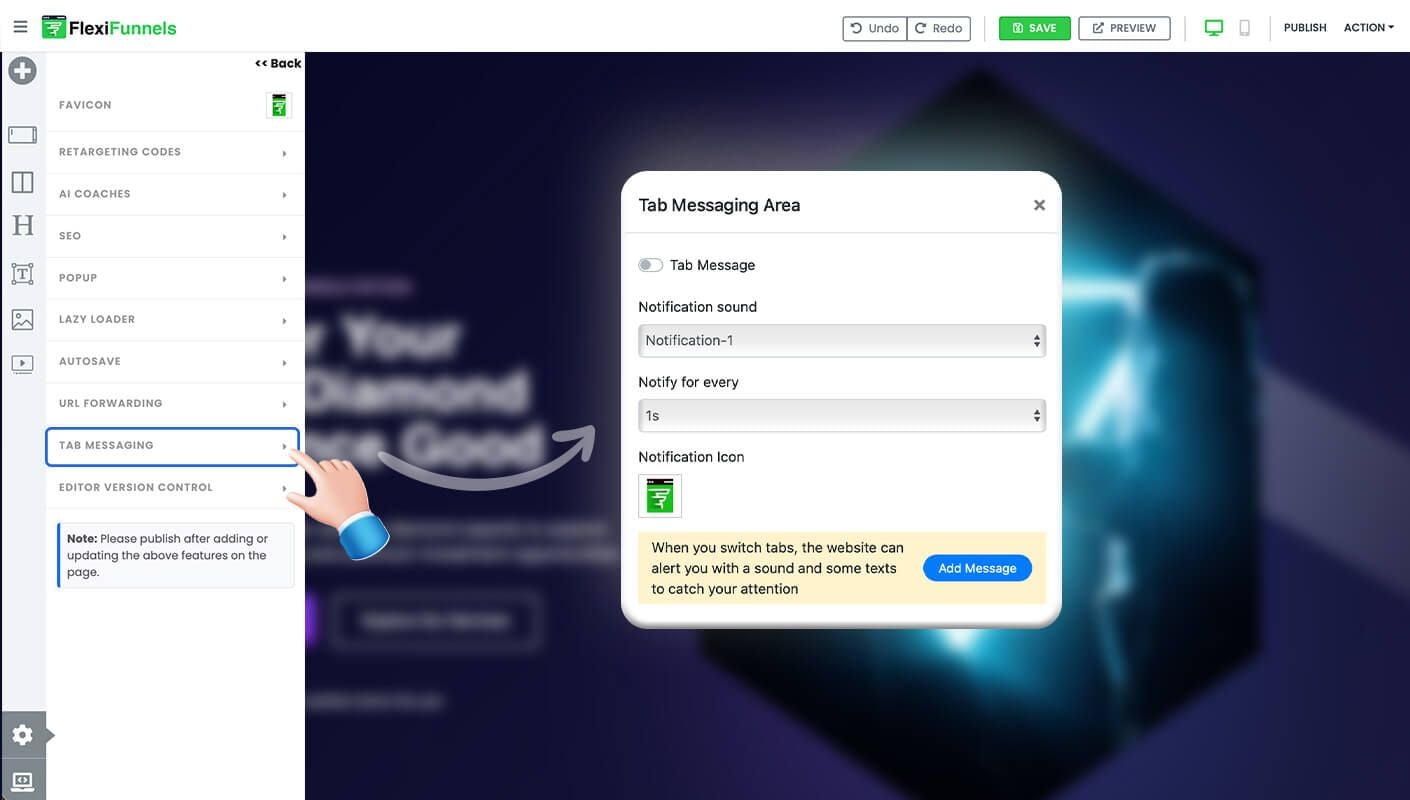
Tab messaging is added in the same editor as proof notifications.
Is it okay to fake social proof?
No. Fake notifications, invented testimonials and made-up numbers destroy trust the moment a visitor notices, and in many countries they can break advertising and consumer-protection rules. Only show what really happened.
This is where a tool that pulls from real activity matters. FlexiProof shows real recent sign-ups and sales from your own funnel, filtered by product and time. That means the only way to look popular is to actually be getting sign-ups, and the minimum-count setting keeps weak numbers hidden rather than invented.
Three simple rules:
Show real events only. Never script or fabricate a notification.
Keep it fresh. A notification about a sale from last year is misleading. Use a short time window.
Respect privacy. Do not show anything that identifies a person in a way they did not expect. Check the privacy and advertising rules that apply in your country.
Who is social proof marketing for?
Coaches and consultants who need strangers to trust a person-led offer.
Course creators selling to cold traffic from ads.
Webinar hosts who want more registrations from the same ad spend.
Digital product sellers whose products have no physical proof.
Agencies adding a quick conversion win to client funnels. Both FlexiFunnels plans include a commercial licence for client work.
Honest limits of live notifications
They need real activity. A brand-new page with no sign-ups has nothing to show, which is why the minimum count exists.
They are one tool, not a strategy. They will not rescue a weak offer or a confusing page.
FlexiFunnels' public pages do not state a cap on the number of notifications or list every customisation option, so check the editor for what you can change.
Results vary. Measure with a test instead of assuming.
How do existing FlexiFunnels customers switch on FlexiProof?
FlexiProof is part of your plan, so there is nothing extra to buy. Open the page you want in the page editor, add a proof notification alongside your other conversion tools, choose a style, source, filters and minimum count, and publish. FlexiFunnels does not publish the exact menu path on its public pages, so use the in-app tutorials or the 24/7 support team for the screens, or use chat as below.
Do it by chatting: the FlexiFunnels MCP
Everything in this guide can also be done through the FlexiFunnels MCP. Connect ChatGPT, Claude or Gemini to your FlexiFunnels account, ask in plain words, approve what it proposes, and it is done. Connect the MCP here and read the FlexiFunnels MCP guide. Flexi Genie is the same chat built into your dashboard (AI funnel builder guide).
Example prompts for social proof:
"Add a recent sign-ups notification to my webinar registration page, last 48 hours only."
"Show recent sales of my course on its sales page, and only show it once there are at least 10."
"Create a copy of my landing page with a social proof notification and split test it against the current page, 50/50."
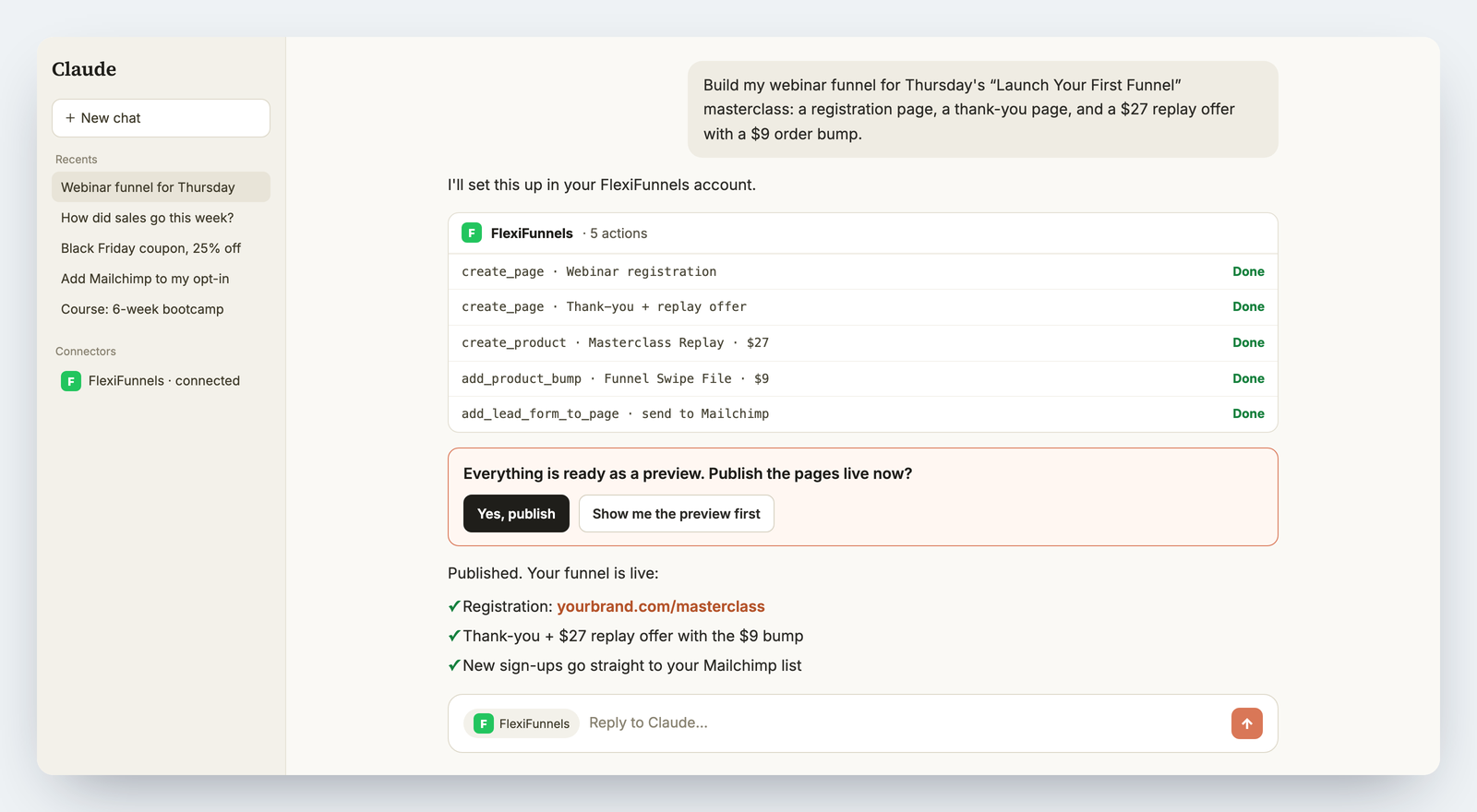
Ask in plain words, approve, done.
MCP and Flexi Genie need an active FlexiFunnels subscription; free Claude and ChatGPT accounts can be used.
How does FlexiProof compare with other options?
Option | Real activity? | Setup | Cost |
|---|---|---|---|
FlexiProof (FlexiFunnels) | Real recent sign-ups and sales from your funnel, with product and time filters | Page editor, no code, or by chat with Flexi Genie and MCP | Included in every plan |
Separate notification plugin or app | Depends on the tool and its integrations | Script or plugin, plus connecting your data | Often a separate subscription |
Manually written testimonials only | Real, but static | You write and update them | Free, but not live |
FlexiFunnels bundles 40+ tools in one platform, including 20+ built-in conversion tools, so proof notifications sit in the same account as your pages, checkout and analytics. Best for: sellers who want live proof built in and who build and run by chat (Flexi Genie + MCP).

Timers and social proof work together: one creates a reason to act, the other makes acting feel safe.
Frequently asked questions
What is social proof marketing?
Social proof marketing is using real evidence of other people's trust and purchases, such as reviews, testimonials, customer counts and live sign-up notifications, to help new visitors feel safe taking the same step. It works because people look to others' behaviour when they are unsure, especially when buying from someone they do not know yet.
What is social proof in sales?
In sales, social proof is anything a prospect can see that shows others have already said yes: testimonials, case studies, client logos, review scores or a note that someone just bought. It shortens the decision because the buyer borrows confidence from people who went first, and it answers doubts before the prospect has to voice them.
What are the main types of social proof?
The main types are customer reviews and ratings, testimonials, case studies, expert or media endorsements, user numbers, and live activity notifications. The strongest pages combine two or three. Live notifications are the only type that shows what is happening right now, which makes them a good partner for static proof.
What are FlexiProof notifications?
FlexiProof is the FlexiFunnels tool that shows pop-up notifications of real recent sign-ups and sales from your funnel on your page. It offers 20+ styles, can pull from one URL or several, filters by product and time window, and has a minimum count. It is added in the page editor with no code.
Can I show fake notifications with FlexiProof?
FlexiProof is designed to show real recent sign-ups and sales from your funnel, and you should never fabricate activity. Fake proof damages trust and can break advertising and consumer-protection rules in many countries. Use the product and time filters and the minimum count to show only real, current, strong numbers.
Do social proof notifications actually increase conversions?
They can, but results depend on your offer, traffic and page, so do not assume. The reliable way to know is to test: run the page with and without notifications as a split test and compare conversion rates. FlexiFunnels split testing runs up to 10 versions on one URL, so you can measure the effect on your own traffic.
Is FlexiProof included in my FlexiFunnels plan?
Yes. FlexiProof is one of the 20+ conversion tools included in both FlexiFunnels plans, and every plan includes every feature; only usage limits differ. You can also try it in the 14-day free trial, which needs no credit card and unlocks every feature like a paid account.
Where do I add social proof notifications in FlexiFunnels?
You add them in the FlexiFunnels page editor, with no code, alongside timers, pop-ups and tab messages. The public pages do not publish a click-by-click path, so use the in-app tutorials or the 24/7 support team for exact screens, or ask Flexi Genie or the FlexiFunnels MCP to add one by chat.
How do I avoid showing weak numbers?
Use the minimum count. FlexiProof lets you set a threshold so a notification appears only once there is enough recent activity, and a time filter such as the last 24 or 48 hours keeps it fresh. This stops a page from showing "one person signed up" and looking empty instead of popular.
Does FlexiProof work for businesses in India?
Yes. FlexiFunnels is a global platform trusted by 23,000+ businesses, and FlexiProof works the same wherever your visitors are. Customers in India can also pay in INR including GST and use regional payment gateways at checkout, so notifications about real sales apply to their pages too.
Add real social proof to your next page
Start with one page, one notification and one honest number, then measure it. Start your 14-day free trial, see FlexiFunnels here, browse the conversion tools page, or book a free 1:1 consultation and we will help you plan it. FlexiFunnels is trusted by 23,000+ businesses and has 24/7 support. Then prove it works with a split test, and read the funnel metrics guide to track the result.