An order bump is a small, optional add-on shown on the checkout page that a buyer adds with one tick. The extra item joins the same order and the same payment, so there is no second checkout. Done well, it raises your average order value without a single extra visitor.
The fastest way to get one live is to say it. Tell Flexi Genie (built into your FlexiFunnels dashboard) or ChatGPT, Claude or Gemini (through the FlexiFunnels MCP) something like: "Add a $27 order bump called 'Swipe File Pack' to my course checkout, then add a $197 one-click upsell after it." Approve what it shows you, and it is built. Prefer to click? FlexiFunnels also lets you add several bumps to one checkout and chain one-click upsells and downsells behind it. This guide covers both ways.
See FlexiFunnels here · Start your 14-day free trial (no credit card required, every feature unlocked like a paid account) · Checkout pages feature page
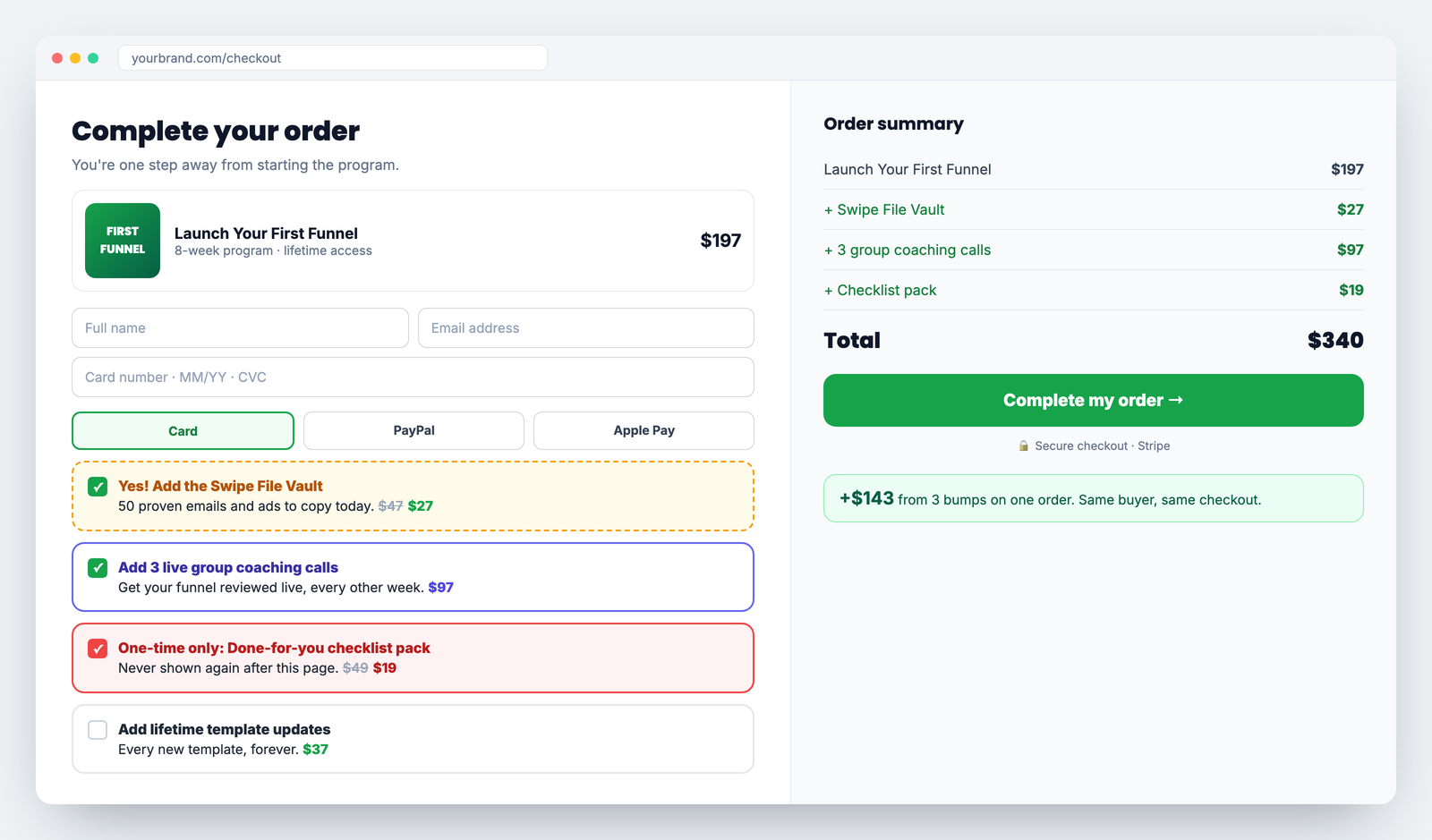
An order bump example from the FlexiFunnels checkout page: three bumps ticked take a $197 order to $340 (sample data).
What is an order bump?
An order bump is an add-on offer placed on the checkout page itself, right next to the payment details. The buyer ticks a box and the item is added to the cart. It is usually cheap, closely related to the main product, and easy to say yes to.
Think of the "add fries?" moment at a burger counter. The customer already decided to buy. The bump asks one small extra question at the moment they are most committed. That is why bumps are a staple of course, coaching and digital product checkouts.
Three things make a bump a bump:
It lives on the checkout page. Not before it, not after it.
It is optional. The buyer can ignore it and still pay for the main product.
It is added with a tick. No new page, no new form, no second card entry.
How does an order bump work on FlexiFunnels?
On FlexiFunnels you add one or several bump offers to a checkout, each in its own style. A buyer ticks a box and the extra item joins the order. According to the FlexiFunnels checkout page, bump buyers can also be sent to their own email list or to a webhook, so you can tag them or trigger a delivery.
These are the pieces the feature page lists:
Multiple bumps on one checkout. The page does not state a maximum, it says "multiple".
Five bump templates: classic box, product card, dark highlight, urgent offer and bundle.
Every currency. Bumps work in every currency, and coupons apply correctly to them.
Bump buyers to a list or webhook. Useful for tagging buyers or starting delivery.
Tracking. Purchase data, including bump purchases, can be sent to Facebook through the Conversions API.
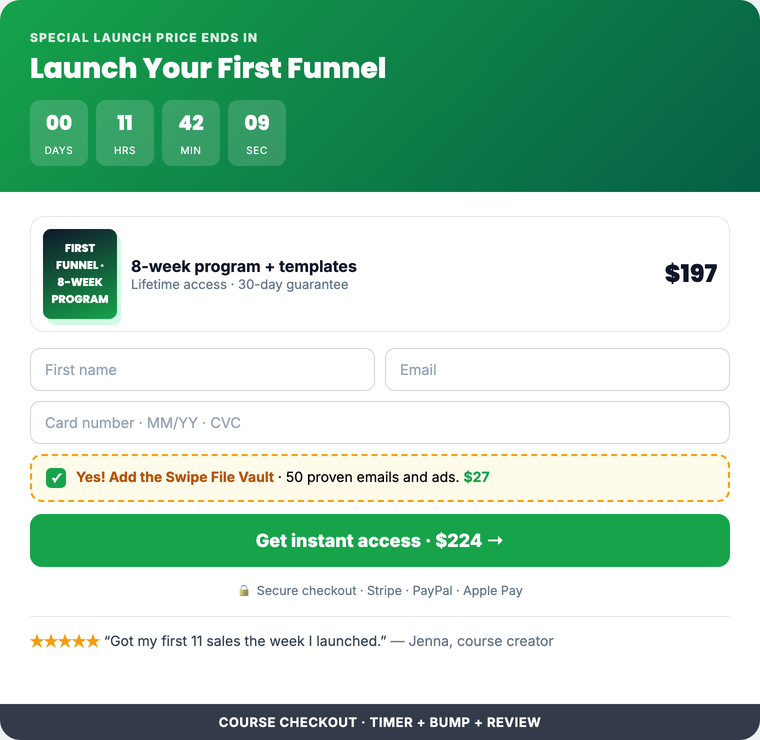
A course checkout with a countdown, an order bump and a review (sample from the FlexiFunnels checkout page).
Order bump vs upsell: what is the difference?
An order bump is shown before the buyer pays, on the checkout page, and rides along on the same payment. An upsell is shown after the first purchase, on its own page, as a separate offer. A downsell is the lighter offer a buyer sees if they decline the upsell.
In general sales terms, upselling encourages a customer to buy a pricier item, an upgrade or an add-on, while cross-selling sells "something else". Funnel builders split the idea into three moments: bump, upsell, downsell.
Offer type | When the buyer sees it | How they accept | Typical job |
|---|---|---|---|
Order bump | On the checkout page, before paying | Tick a box | Cheap add-on that complements the main product |
One-click upsell | Right after the first purchase | One click, payment details already saved | A bigger or complementary offer |
Downsell | After the buyer says no to the upsell | One click | A lighter, cheaper alternative |
What should you offer as an order bump?
Offer something small that makes the main purchase work better, is cheap relative to it, and can be delivered instantly. The best bumps feel like an obvious accessory, not a second product that needs its own sales page.
Ideas by business type (all examples, not promises of results):
Course creators: a printable workbook, a template pack, a recorded Q&A or a "fast-start" checklist.
Coaches: a recorded group call, a planning template or a short audio training.
Digital product sellers: a licence extension, extra file formats or a bonus bundle.
Agencies: a done-for-you add-on, such as an extra landing page or an ad-copy pack.
Five rules for a bump that gets ticked
Keep it relevant. If it does not help the buyer get the main result faster, it is a distraction.
Keep it small. A common guideline is a fraction of the main price. Test your own number rather than trusting a rule.
Say what it is in one line. A short headline and one sentence of benefit.
Make it instant. Digital delivery keeps support low.
Be clear about the price. The US Federal Trade Commission's small-business advertising guide says disclosures must be clear and conspicuous. Show the bump's price next to the tick box.
What does a bump do to your average order value? A worked example
This is a made-up example to show the maths, not a result you should expect. Suppose Sarah sells a $97 course and sends 1,000 buyers through checkout. She adds a $27 bump and a $17 bump.
Front end: 1,000 × $97 = $97,000
$27 bump ticked by 20% (200 buyers): 200 × $27 = $5,400
$17 bump ticked by 10% (100 buyers): 100 × $17 = $1,700
Total with bumps: $97,000 + $5,400 + $1,700 = $104,100, so average order value = $104.10
Now she adds a $197 one-click upsell, accepted by 8% of the 1,000 buyers (80 buyers), and a $67 downsell, accepted by 10% of the 920 who declined (92 buyers):
Upsell: 80 × $197 = $15,760
Downsell: 92 × $67 = $6,164
Grand total: $104,100 + $15,760 + $6,164 = $126,024, so average order value = $126.02
Same traffic, same ad spend. The only change is what happens at and after the checkout. Your take rates will differ, so treat the percentages as placeholders and measure your own. For how to read those numbers, see Funnel Metrics That Matter: Conversion Rate, Cost per Lead, AOV and EPC.
Step (example only) | Take rate | Buyers | Revenue | Running AOV |
|---|---|---|---|---|
$97 course | 100% | 1,000 | $97,000 | $97.00 |
+ $27 bump | 20% | 200 | $5,400 | $102.40 |
+ $17 bump | 10% | 100 | $1,700 | $104.10 |
+ $197 upsell | 8% | 80 | $15,760 | $119.86 |
+ $67 downsell | 10% of decliners | 92 | $6,164 | $126.02 |
Try FlexiFunnels here and build this exact stack on a trial account. Every feature is unlocked for the 14 days.
How do one-click upsells and downsells work?
Right after the first purchase, the next offer appears. The buyer accepts with one click because their payment details are already saved. If they decline, they go to a downsell. You can add as many steps as the offer needs.
The FlexiFunnels feature page lists these abilities:
Unlimited upsells and downsells in one funnel. The page lists no numeric cap.
Several products on one upsell page. A single upsell or downsell can carry multiple products with multiple price options. FlexiFunnels says ClickFunnels allows one product per upsell or downsell. Check clickfunnels.com for what it offers today.
Conditional flow. What the buyer sees next depends on what they bought.
Multi-path journeys for different kinds of buyers.
The sample funnel flow on the page runs: opt-in or webinar page, sales page, checkout with bumps, one-click upsell, downsell if they say no, thank-you page. For the full picture of building that chain, read Sales Funnel Builder: How to Build a Funnel That Sells.
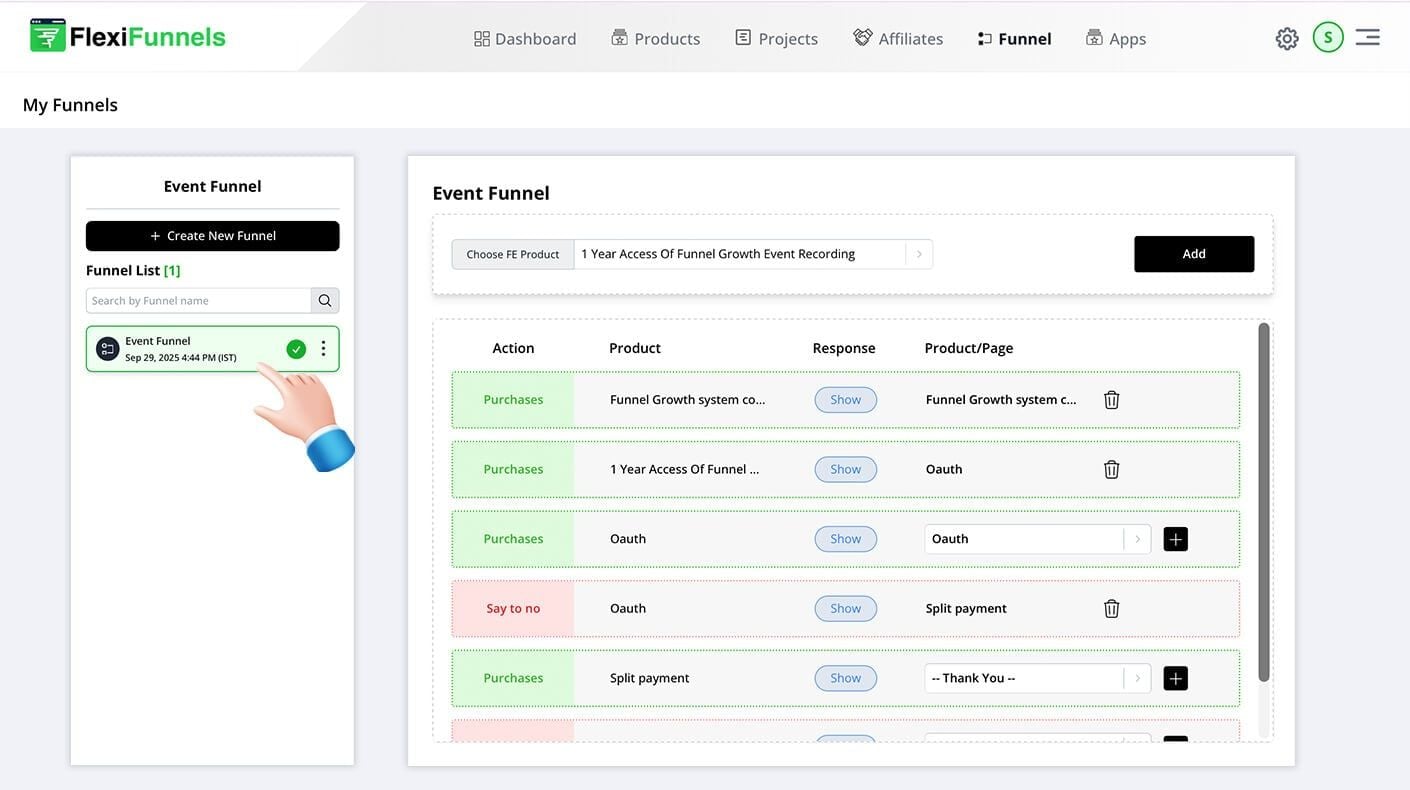
A funnel with a purchase path and a say-no path, so a declined upsell leads to a lighter downsell.
How to add an order bump to your checkout: step by step
The FlexiFunnels page gives two general routes rather than a bump-specific click path: build the checkout from a template or with drag and drop, then add bumps, or describe the product and price to the AI and let it build the checkout with bumps and coupons. Here is the planning order that works either way.
Create the main product and price. Decide the front-end offer first.
Build or pick a checkout. Start from a checkout template (the page lists 100+) or build it with drag and drop.
Add your first bump. Choose one of the five templates: classic box, product card, dark highlight, urgent offer or bundle.
Write the offer. One headline, one line of benefit, the price clearly shown.
Add a second bump if it fits. The page says multiple bumps are supported. Start with one or two so the page stays clear.
Route bump buyers. Send them to their own list or a webhook if you want tagging or delivery.
Preview and test a purchase. Run a test order before sending traffic.
Add the upsell and downsell. In the funnel logic, put a one-click upsell after the checkout and a lighter downsell on the decline path.
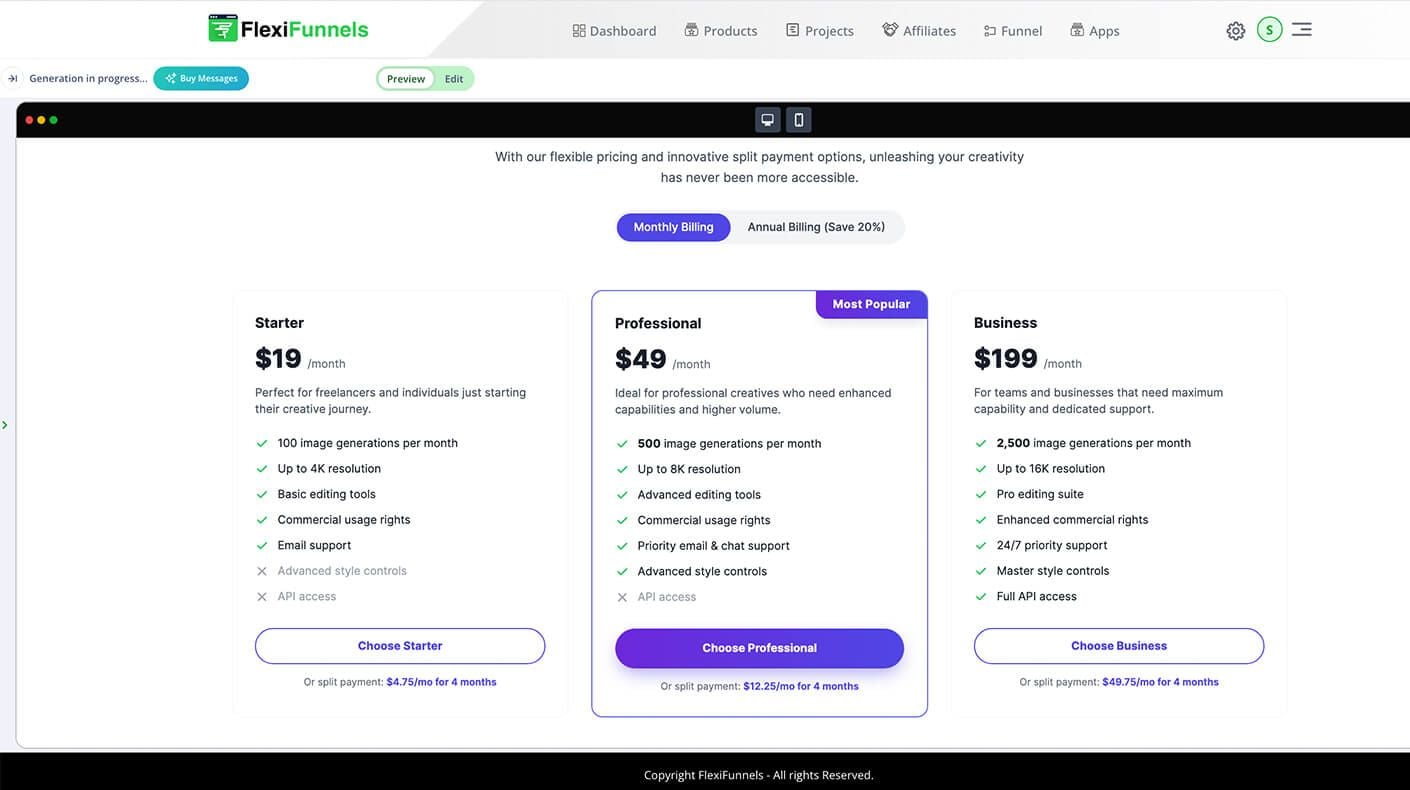
A checkout with three plans and a split payment option under each.
Do it by chatting: the FlexiFunnels MCP
Everything in this post can also be done through the FlexiFunnels MCP. Connect ChatGPT, Claude or Gemini to your FlexiFunnels account, ask in plain words, approve what it shows you, and it is done. The same chat is built into the dashboard as Flexi Genie (see AI Funnel Builder: Build and Run Your Sales Funnel Just by Chatting), and the full setup guide is in FlexiFunnels MCP: Run Your Funnels, Checkout and Courses From ChatGPT, Claude or Gemini.
Example prompts for this feature:
"Create a checkout for my $97 'Launch Plan' course and add a $27 order bump called 'Template Pack'."
"After the checkout, add a one-click upsell for my $197 coaching call and a $67 downsell if they say no."
"Add a second order bump for $17 and send those buyers to my 'bump buyers' list."
Be honest about the limits: the FlexiFunnels MCP and Flexi Genie do not yet support add-to-cart or product variants that change the price, and FlexiFunnels says multi-product stores are not supported yet. Single-product funnels with bumps, upsells and cart recovery are supported.
How do you switch it on if you are already a FlexiFunnels customer?
Order bumps live on your checkout page, and upsells and downsells live in your funnel's logic. Open the checkout of the product you sell and add a bump from the checkout builder. Then open the funnel that contains it and add the upsell and downsell steps after the checkout. FlexiFunnels also has an in-app video tutorial called "Funnel Logics Setup with Upsells & Downsells" in the tutorials area.
If you would rather not hunt for the menu, ask Flexi Genie in your dashboard to do it and approve the preview. Both Professional and Premium plans include one-click upsells, downsells and multiple bump offers, because every plan includes every feature. Only the usage limits differ.
How do bumps work with coupons, payment plans and cart recovery?
Bumps sit comfortably next to the other checkout tools. The feature page says coupons apply correctly to bumps. Checkouts can also show split payment options, and cart recovery can send an automatic sequence of up to 15 emails to people who started checkout but did not pay.
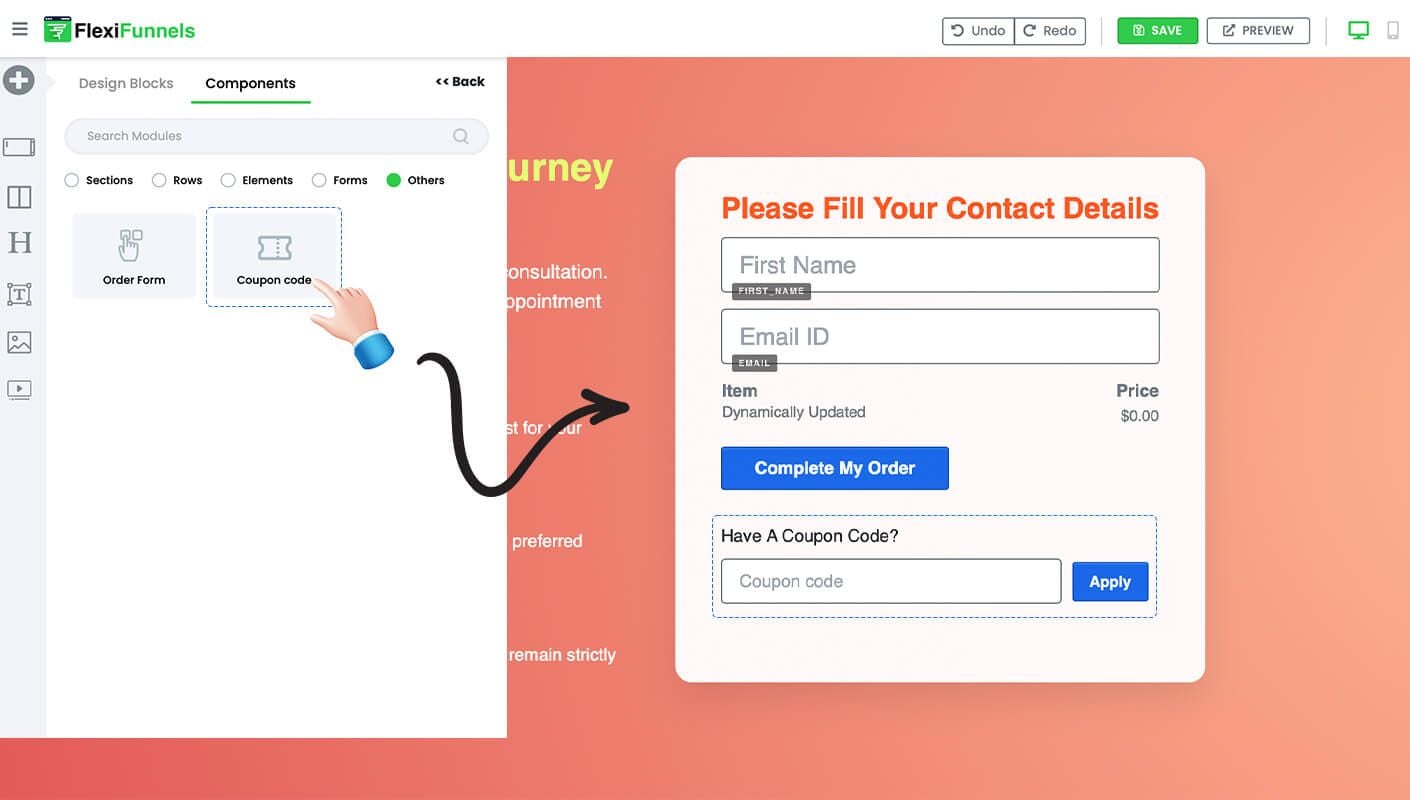
A coupon box on a FlexiFunnels checkout. Coupons apply correctly to order bumps.
Why this matters: Baymard Institute's research page puts the documented average online cart abandonment rate at 70.22% (an unweighted average of 50 studies, last updated October 2026). Among shoppers who abandoned a cart, the top reason after "just browsing" was extra costs being too high (40%). So a bump should never add surprise costs. Show its price clearly, and keep the main total honest. Our guide to the checkout page covers the rest of the layout, and recurring payments covers subscriptions.
How do you pick the right payment methods for a bump checkout?
Use the payment methods your buyers already trust, and keep them side by side. FlexiFunnels checkouts can show several gateways together. Lead with cards, Stripe, PayPal and Paddle. Regional gateways such as Razorpay, Cashfree, Instamojo, Xendit and Paystack serve India, Southeast Asia and Africa. The feature page mentions 8 payment gateways in total.
How do you measure whether a bump is working?
Track the take rate, the change in average order value and the refund rate. A bump that is ticked often but refunded often is a bad bump. FlexiFunnels analytics report page views, conversion, orders, revenue and average order value, and the product report shows views, sales, revenue and conversion rates.
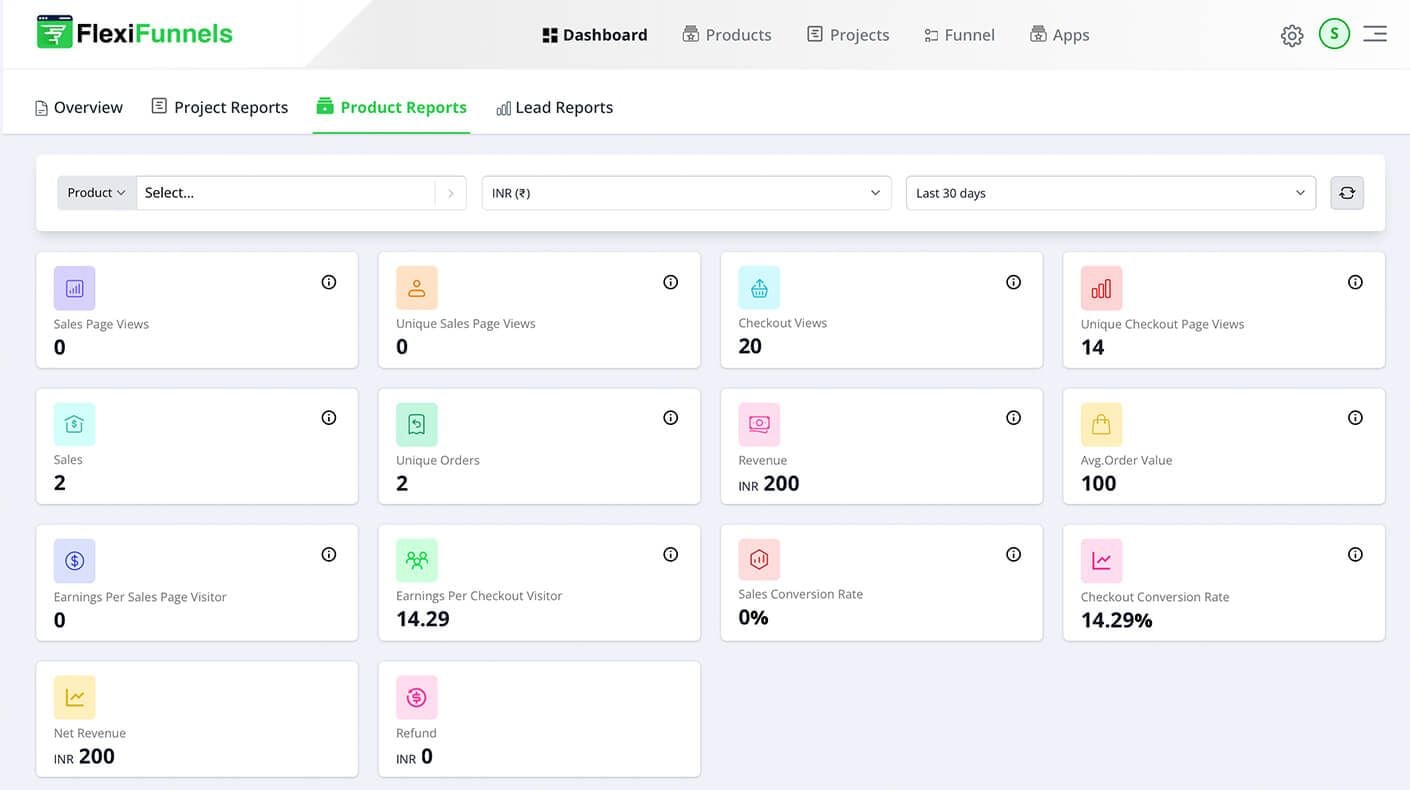
The FlexiFunnels product report shows views, sales, revenue and conversion rates.
A simple test plan:
Run the checkout with no bump for a week to get a baseline average order value.
Add one bump and change nothing else.
Compare average order value, conversion rate and refunds.
Only then change the headline, price or template, one thing at a time.
If you run Meta ads, pair this with Source Tracking to see which ads bring the buyers who take the bump.
Who are order bumps and one-click upsells for?
Course creators selling a front-end course who want a workbook or template bump.
Coaches and consultants with a low-ticket entry offer and a high-ticket upsell.
Digital product sellers of ebooks, templates and downloads.
Agencies building funnels for clients (both plans include a commercial licence).
Anyone running paid ads who wants more revenue from each buyer they already paid for.
What are the honest limits?
The checkout page gives no step-by-step bump setup and no numeric cap on bumps, so test what your page layout can carry comfortably.
Multi-product stores, add-to-cart and price-changing variants are not supported. FlexiFunnels is built around single-product funnels.
Any lift in average order value depends on your offer, your audience and your pricing. FlexiFunnels shows an example checkout going from $197 to $340, but that is sample data, not a promise.
Stacking too many bumps can clutter the page and hurt the main conversion. Test one at a time.
How does FlexiFunnels compare with other ways to add bumps?
Approach | Multiple bumps | One-click upsell and downsell | Setup by chat |
|---|---|---|---|
FlexiFunnels | Yes (multiple, no cap stated) | Yes, several products per upsell page | Yes, Flexi Genie and the MCP |
A bump plugin on a separate store | Depends on the plugin | Depends on the plugin | No |
Funnel builder with a one-product upsell limit | Check the vendor | One product per step (per FlexiFunnels' comparison) | Check the vendor |
For the head-to-head, see FlexiFunnels vs ClickFunnels. FlexiFunnels' own figures on that page should be checked against clickfunnels.com before you decide.
Frequently asked questions
What is an order bump?
An order bump is a small, optional add-on shown on the checkout page. The buyer ticks a box and the extra item joins the same order and payment. It is usually priced low and closely related to the main product, so saying yes takes no effort.
What is the difference between an order bump and an upsell?
A bump appears on the checkout page before payment and rides on the same payment. An upsell appears after the first purchase on its own page. On FlexiFunnels the buyer accepts an upsell with one click because their payment details are already saved.
How many order bumps can I add to one checkout?
FlexiFunnels supports multiple bumps on one checkout, and its feature page does not state a maximum. In practice one or two keep the page clear. Start with a single bump, measure the take rate and average order value, then add another only if the numbers justify it.
What should an order bump cost?
Keep it a small fraction of the main price and easy to decide on. There is no universal number, so test your own. The worked example above uses $27 and $17 bumps next to a $97 course, but those are illustrative figures, not a recommendation or a promise.
Can I add an order bump just by chatting?
Yes. With Flexi Genie in your dashboard, or ChatGPT, Claude or Gemini connected through the FlexiFunnels MCP, you can ask for a checkout with a bump in plain words, review the preview and approve. An active FlexiFunnels account is required, and the trial counts.
Do coupons work with order bumps?
Yes. The FlexiFunnels checkout page says coupons apply correctly to bumps. Coupons can be global or product-specific, a percentage or a fixed amount, with expiry dates and usage limits, so you can reward early buyers without breaking the bump.
What are the five order bump templates?
The FlexiFunnels checkout page lists five bump templates: classic box, product card, dark highlight, urgent offer and bundle. Pick the one that matches your page style, and avoid fake countdowns or scarcity you cannot back up.
Can bump buyers be tagged or sent to a separate list?
Yes. According to the feature page, bump buyers can be sent to their own list or a webhook. That lets you tag them, deliver a bonus automatically or start a different follow-up from the one for front-end-only buyers.
How many upsells and downsells can I add?
The FlexiFunnels feature page describes unlimited upsells and downsells in one funnel and lists no numeric cap. You can chain as many steps as the offer needs, with conditional flow so the next step depends on what the buyer purchased.
Does FlexiFunnels support physical products and multi-product stores?
FlexiFunnels offers single-product funnels with bumps, upsells and cart recovery, including for physical products. It says multi-product stores are not supported yet, and the MCP and Flexi Genie do not yet support add-to-cart or variants that change the price.
Do I need a paid plan to try order bumps?
No. FlexiFunnels offers a 14-day free trial with no credit card required, and every feature is unlocked like a paid account. Both Professional and Premium include one-click upsells, downsells and multiple bump offers.
Does FlexiFunnels work for sellers in India?
Yes. FlexiFunnels is global, and for Indian customers pricing is also available in INR including GST, with UPI, net banking and domestic cards plus regional gateways such as Razorpay, Cashfree and Instamojo supported at checkout.
Next step: add your first bump today
Pick one cheap, relevant add-on, put it on your checkout, and measure. Then add the one-click upsell. Start your 14-day free trial, see FlexiFunnels here, or book a free 1:1 consultation and we will walk through your offer with you. FlexiFunnels is trusted by 23,000+ businesses and support is 24/7.